
Microsoft is rolling out Vision in Microsoft 365 Copilot, enabling users to share their desktop screen or mobile camera for real-time visual AI analysis. This allows Copilot to analyze on-screen content and answer questions grounded in both visual data and the user’s organizational context.
Copilot Vision will be available by default for users with a Microsoft 365 Copilot license. AI admins can already control the feature for the screen, camera, or both.
Timeline
The rollout should be completed by July 2026.
How does this affect your organization?
During a voice conversation with Copilot, users will soon be able to initiate a screen or camera share to ask questions directly about the visual content they are showing.
- On desktop: The feature is accessible via the Copilot Chat input box in the Copilot app, the dedicated Copilot key, or the Win+C shortcut. Users can select “Start Screen Share” to begin. A “Sharing your screen” indicator will remain active during the session, and clicking “Stop sharing” concludes it.
- On mobile: A dedicated camera icon in the Copilot app lets users easily start and stop camera sharing.
Every sharing session is entirely user-initiated and restricted to the active conversation; Copilot processes content only while sharing is enabled. Shared audio and video data is automatically deleted after 48 hours. However, if a user submits feedback, Microsoft temporarily retains the associated data to address the submission.
Vision in Microsoft 365 Copilot will be available by default for Copilot Premium users, provided the app has been granted screen or camera permissions.
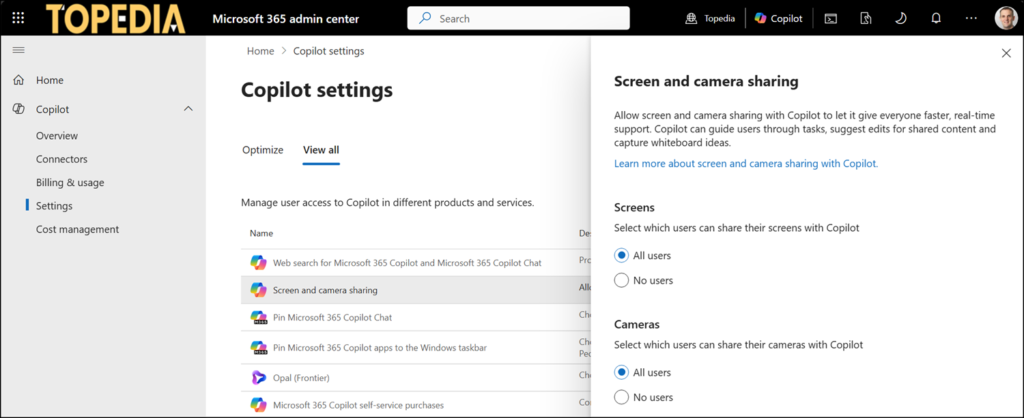
Administrators can already control this feature via the Microsoft 365 admin center > Copilot > Settings > Screen and camera sharing. Management options allow admins to disable vision capabilities for screen sharing, camera sharing, or both. Notably, disabling Copilot Vision will not affect the voice features.
While Microsoft points to the official Data, Privacy, and Security page for Microsoft 365 Copilot, documentation specifically detailing the new Copilot Vision features has not yet been added. Vision processing should use the existing Copilot data-handling practices.
