
The Frontier Admin Control in the Microsoft 365 admin center now supports Entra ID groups again for managing Frontier enrollment, in addition to individual user assignment. This allows administrators to align Frontier pilot audience management with existing group-based access practices.
Just a reminder: This group assignment option was available until 10 November 2025. Microsoft removed it in November 2025, a decision that was always questionable.
Timeline
The rollout should be completed in June 2026.
How does this affect your organization?
AI Admins can now assign Frontier access to Entra ID groups again from the Frontier Admin Control in the Microsoft 365 admin center, alongside individual user assignments. This allows pilot audiences to be scoped without enabling Frontier for the entire tenant.
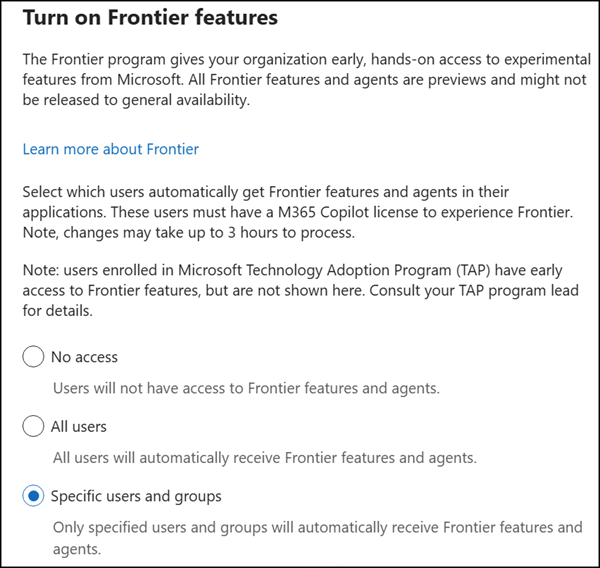
There are some notable points to consider:
- The system supports up to 10,000 users in the Frontier program if using individual user and group assignments. Admins will see a warning if adding a group would cause the total enrolled user count to exceed this limit, and must remove users or groups until the total enrollment falls within the limit.
- Nested groups are not supported for group assignment, but you can add multiple groups.
- Tenants configured to enroll all users are not subject to the 10,000-user limit.
A reminder from the Frontier update in April:
- Users in the Beta Channel (for Microsoft 365 Apps) are enabled for Frontier features by default (but only in the Word, Excel, and PowerPoint desktop apps), regardless of their state in the Frontier Admin Control.
- Users in Current Channel (Preview) or Current Channel are enabled for Frontier features only if they are added to the Frontier Admin Control.
- A Microsoft 365 Copilot license is required to use Frontier features.
