
Microsoft is introducing an enforced retention lifecycle for unlicensed OneDrive for Business accounts, which are created when a license is removed or a user is deleted. The lifecycle moves an account through read-only, archived, and deletion stages over time, while giving administrators several ways to preserve data before deletion occurs.
Timeline
The updated retention lifecycle is scheduled to begin in July 2026.
How does this affect organizations?
On 27 January 2025, Microsoft began blocking access to OneDrive site collections owned by an unlicensed account after 93 days. Microsoft recommends three options in this scenario:
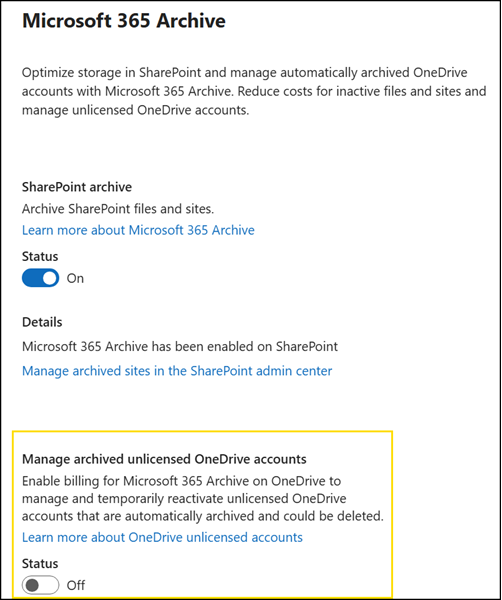
- Setting up the Microsoft 365 Archive billing for unlicensed accounts.
- Delete the unlicensed OneDrive account if it does not have a retention policy applied.
- Re-license the unlicensed account to maintain access.
The primary issue for Microsoft is the first scenario, if an organization does not configure Microsoft 365 Archive. Yes, the OneDrive site collection is not accessible to users or admins, but it remains in place and uses Microsoft storage “for free”; at worst, 25 TB. OneDrive site collections owned by an unlicensed account currently persist indefinitely until an administrator takes action.
When Microsoft introduced this change in January 2025, I wondered how it would actually encourage organizations to configure Microsoft 365 Archive, since a license could simply be added whenever the OneDrive is needed again.
Microsoft changes this indefinite scenario with this update. Each unlicensed account moves through an enforcement sequence unless a license is reassigned or Microsoft 365 Archive billing is enabled.
- Day 60 after license removal: The OneDrive site collection becomes read-only.
- Day 93 after license removal: The OneDrive site collection is archived. Users can no longer access the content directly, but it remains available for eDiscovery and legal holds.
- After up to 12 cumulative unlicensed or unpaid months: The OneDrive data is permanently deleted.
If a license is reassigned or billing is enabled at any point during the 12-month window, the account exits retention enforcement and resumes normal behavior. - OneDrive site collections with retention policy, retention setting, or litigation hold:
Archived OneDrive accounts fully honor retention policies, settings, and litigation holds.
For example, if your company has a five-year retention policy, it remains unchanged whether the OneDrive account is active or archived. Archiving doesn’t reset the timeline of the retention policy or holds. Hold can be placed on unlicensed accounts before or after the account is put into archive. Similarly, holds can be placed on unlicensed accounts regardless of whether unlicensed OneDrive account billing is enabled.
Note that you will soon have two Pay-as-you-go billing options for unlicensed OneDrive accounts:
- Archived OneDrive storage, charged at $0.05/GB/month with Microsoft 365 Archive. Keeps archived OneDrive data retained and billable without reassigning a license. The OneDrive is not accessible in an archived state.
- Active OneDrive storage, with OneDrive Storage PAYG (Planned). Keeps an unlicensed OneDrive site collection out of the archived state without reassigning a license. The OneDrive is accessible in an active state. I expect to be charged at $0.20/GB/month.
Since Microsoft introduced the unlicensed OneDrive account changes in January 2025, a “Deletion scheduled on” column has been available in the SharePoint admin center > OneDrive accounts reports.
“Deletion scheduled on” refers to when the system tries to delete the account next. It takes into account the retention period of the unlicensed OneDrive account. This property may be empty if there’s a hold or retention policy applied to the account. Additionally, the column is empty for users who are still active in Entra ID until the ‘deletion’ part of the enforcement rollout is complete. If you delete the active user from Entra ID, and there’s no retention policy or hold applied, then the “Deletion scheduled on” column will be populated within 7 days.
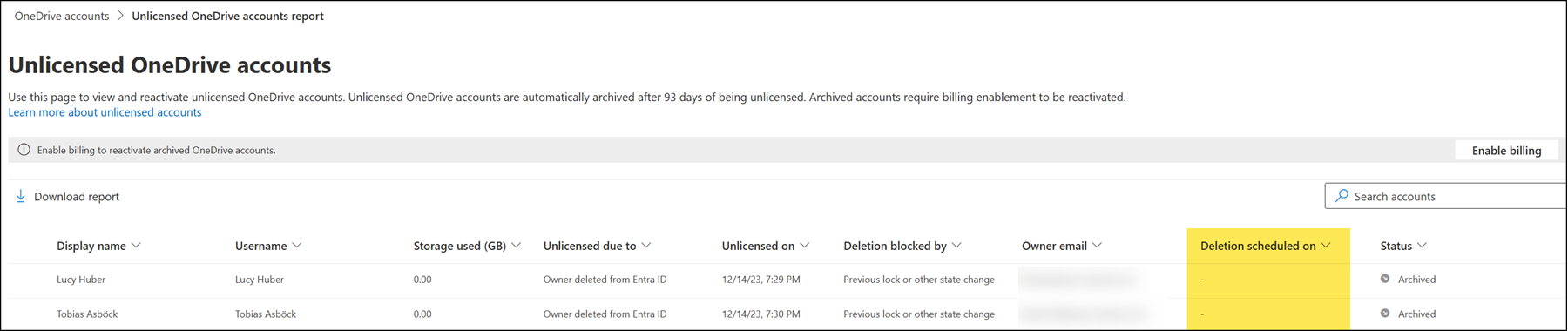
Administrators should check this column once the update has been implemented in July if their organization has unlicensed OneDrive accounts without Microsoft 365 Archive billing enabled.
