
As posted in April, Microsoft plans to add Intune (Suite) and Defender features to Microsoft 365 E5, E3, and Office 365 E3 licenses, initially scheduled for July. I expect they are also available for E7 licenses.
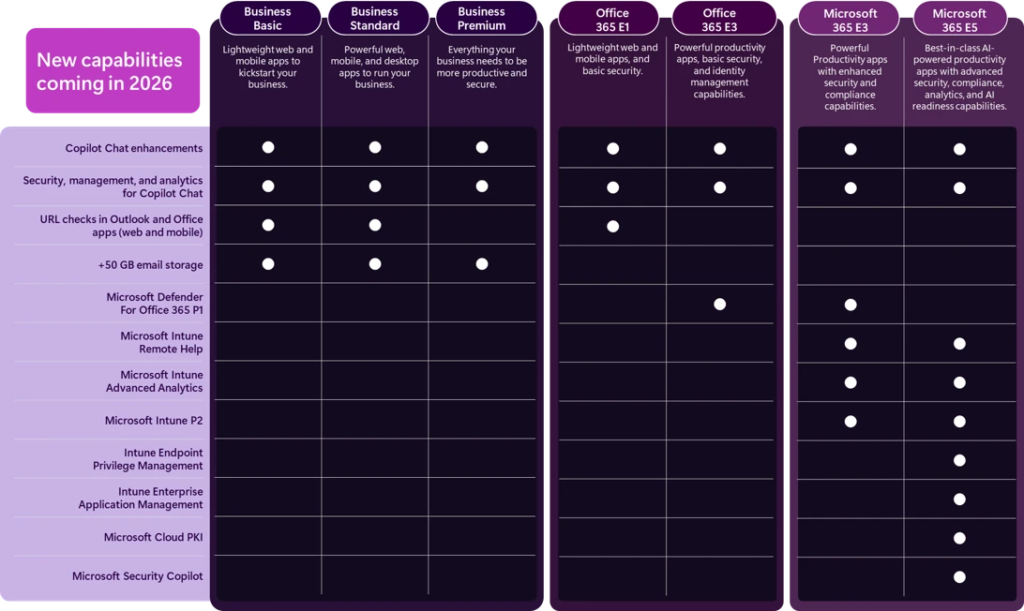
You should now check your licenses and the new service plans to review their activation status, as Microsoft has already added the features to your licenses. You will find new service plans. As usual with new service plans, they are enabled by default.
In some tenants, the service plans are still in pending provision mode; in others, they are already active. I prepared Microsoft Graph samples to check the state in your tenant.
Content
Microsoft 365 E5 (and E7)
Microsoft 365 E5 customers will find these 8 new service plans; the same likely applies to E7 customers (I could not verify it for E7).
- Remote Help
- servicePlanName: REMOTE_HELP
- servicePlanId: a4c6cf29-1168-4076-ba5c-e8fe0e62b17e
- ServiceNow Integration with Microsoft Intune (connector for Remote Help)
- servicePlanName: Intune_ServiceNow
- servicePlanId: 3eeb8536-fecf-41bf-a3f8-d6f17a9f3efc
- Microsoft Tunnel for Mobile Application Management
- servicePlanName: Intune-MAMTunnel
- servicePlanId: a6e407da-7411-4397-8a2e-d9b52780849e
- Endpoint Privilege Management
- servicePlanName: Intune-EPM
- servicePlanId: bb73f429-78ef-4ff2-83c8-722b04c3e7d1
- Microsoft Intune Plan 2
- servicePlanName: INTUNE_P2
- servicePlanId: d9923fe3-a2de-4d29-a5be-e3e83bb786be
- Advanced Analytics
- servicePlanName: Intune_AdvancedEA
- servicePlanId: 2a4baa0e-5e99-4c38-b1f2-6864960f1bd1
- Microsoft Cloud PKI
- servicePlanName: CLOUD_PKI
- servicePlanId: 795aec3a-93a2-45be-92c4-47b9a76340ca
- Microsoft Intune Enterprise Application Management
- servicePlanName: 3_PARTY_APP_PATCH
- servicePlanId: 3afa0b92-83ef-41c1-8d64-586ab882a951
The Microsoft Graph sample to retrieve the service plans for the Microsoft 365 E5 SKU.
Import-Module Microsoft.Graph.Authentication
Connect-Graph -Scopes LicenseAssignment.Read.All | Out-Null

$Url = "https://graph.microsoft.com/v1.0/subscribedSkus"
$SKUResults = Invoke-GraphRequest -Method GET -Uri $Url -ContentType "application/json"
$M365E5SKU = $SKUResults.value | Where-Object { $_.skuId -eq "06ebc4ee-1bb5-47dd-8120-11324bc54e06" } # SKU for Microsoft 365 E5

$M365E5SKU.servicePlans | Where-Object { $_.servicePlanId -in @(
    "a4c6cf29-1168-4076-ba5c-e8fe0e62b17e",  # REMOTE_HELP
    "a6e407da-7411-4397-8a2e-d9b52780849e",  # Intune-MAMTunnel
    "bb73f429-78ef-4ff2-83c8-722b04c3e7d1",  # Intune-EPM
    "3eeb8536-fecf-41bf-a3f8-d6f17a9f3efc",  # Intune_ServiceNow
    "d9923fe3-a2de-4d29-a5be-e3e83bb786be",  # INTUNE_P2
    "2a4baa0e-5e99-4c38-b1f2-6864960f1bd1",  # Intune_AdvancedEA
    "795aec3a-93a2-45be-92c4-47b9a76340ca",  # CLOUD_PKI
    "3afa0b92-83ef-41c1-8d64-586ab882a951"   # 3_PARTY_APP_PATCH
) } |
    Select-Object servicePlanName, servicePlanId, appliesTo, provisioningStatus, @{N="skuPartNumber";E={$M365E5SKU.skuPartNumber}}, @{N="skuId";E={$M365E5SKU.skuId}} | convertto-json
Check the provisioningStatus in the response.
[
  {
    "servicePlanName": "REMOTE_HELP",
    "servicePlanId": "a4c6cf29-1168-4076-ba5c-e8fe0e62b17e",
    "appliesTo": "User",
    "provisioningStatus": "PendingProvisioning",
    "skuPartNumber": "SPE_E5",
    "skuId": "06ebc4ee-1bb5-47dd-8120-11324bc54e06"
  },
  {
    "servicePlanName": "Intune-MAMTunnel",
    "servicePlanId": "a6e407da-7411-4397-8a2e-d9b52780849e",
    "appliesTo": "User",
    "provisioningStatus": "PendingProvisioning",
    "skuPartNumber": "SPE_E5",
    "skuId": "06ebc4ee-1bb5-47dd-8120-11324bc54e06"
  },
  {
    "servicePlanName": "Intune-EPM",
    "servicePlanId": "bb73f429-78ef-4ff2-83c8-722b04c3e7d1",
    "appliesTo": "User",
    "provisioningStatus": "PendingProvisioning",
    "skuPartNumber": "SPE_E5",
    "skuId": "06ebc4ee-1bb5-47dd-8120-11324bc54e06"
  },
  {
    "servicePlanName": "Intune_ServiceNow",
    "servicePlanId": "3eeb8536-fecf-41bf-a3f8-d6f17a9f3efc",
    "appliesTo": "User",
    "provisioningStatus": "PendingProvisioning",
    "skuPartNumber": "SPE_E5",
    "skuId": "06ebc4ee-1bb5-47dd-8120-11324bc54e06"
  },
  {
    "servicePlanName": "INTUNE_P2",
    "servicePlanId": "d9923fe3-a2de-4d29-a5be-e3e83bb786be",
    "appliesTo": "User",
    "provisioningStatus": "PendingProvisioning",
    "skuPartNumber": "SPE_E5",
    "skuId": "06ebc4ee-1bb5-47dd-8120-11324bc54e06"
  },
  {
    "servicePlanName": "Intune_AdvancedEA",
    "servicePlanId": "2a4baa0e-5e99-4c38-b1f2-6864960f1bd1",
    "appliesTo": "User",
    "provisioningStatus": "PendingProvisioning",
    "skuPartNumber": "SPE_E5",
    "skuId": "06ebc4ee-1bb5-47dd-8120-11324bc54e06"
  },
  {
    "servicePlanName": "CLOUD_PKI",
    "servicePlanId": "795aec3a-93a2-45be-92c4-47b9a76340ca",
    "appliesTo": "User",
    "provisioningStatus": "PendingProvisioning",
    "skuPartNumber": "SPE_E5",
    "skuId": "06ebc4ee-1bb5-47dd-8120-11324bc54e06"
  },
  {
    "servicePlanName": "3_PARTY_APP_PATCH",
    "servicePlanId": "3afa0b92-83ef-41c1-8d64-586ab882a951",
    "appliesTo": "User",
    "provisioningStatus": "PendingProvisioning",
    "skuPartNumber": "SPE_E5",
    "skuId": "06ebc4ee-1bb5-47dd-8120-11324bc54e06"
  }
]
Microsoft 365 E3
Microsoft 365 E3 customers will find these 6 new service plans:
- Remote Help
- servicePlanName: REMOTE_HELP
- servicePlanId: a4c6cf29-1168-4076-ba5c-e8fe0e62b17e
- ServiceNow Integration with Microsoft Intune (connector for Remote Help)
- servicePlanName: Intune_ServiceNow
- servicePlanId: 3eeb8536-fecf-41bf-a3f8-d6f17a9f3efc
- Microsoft Tunnel for Mobile Application Management
- servicePlanName: Intune-MAMTunnel
- servicePlanId: a6e407da-7411-4397-8a2e-d9b52780849e
- Microsoft Intune Plan 2
- servicePlanName: INTUNE_P2
- servicePlanId: d9923fe3-a2de-4d29-a5be-e3e83bb786be
- Advanced Analytics
- servicePlanName: Intune_AdvancedEA
- servicePlanId: 2a4baa0e-5e99-4c38-b1f2-6864960f1bd1
- Microsoft Defender for Office 365 (Plan 1)
- servicePlanName: ATP_ENTERPRISE
- servicePlanId: f20fedf3-f3c3-43c3-8267-2bfdd51c0939
The Microsoft Graph sample to retrieve the service plans for the Microsoft 365 E3 SKU.
Import-Module Microsoft.Graph.Authentication
Connect-Graph -Scopes LicenseAssignment.Read.All | Out-Null

$Url = "https://graph.microsoft.com/v1.0/subscribedSkus"
$SKUResults = Invoke-GraphRequest -Method GET -Uri $Url -ContentType "application/json"

$M365E3SKU = $SKUResults.value | Where-Object { $_.skuId -eq "05e9a617-0261-4cee-bb44-138d3ef5d965" } # SKU for Microsoft 365 E3
$M365E3SKU.servicePlans | Where-Object { $_.servicePlanId -in @(
    "a4c6cf29-1168-4076-ba5c-e8fe0e62b17e",  # REMOTE_HELP
    "a6e407da-7411-4397-8a2e-d9b52780849e",  # Intune-MAMTunnel
    "bb73f429-78ef-4ff2-83c8-722b04c3e7d1",  # Intune-EPM
    "3eeb8536-fecf-41bf-a3f8-d6f17a9f3efc",  # Intune_ServiceNow
    "d9923fe3-a2de-4d29-a5be-e3e83bb786be",  # INTUNE_P2
    "2a4baa0e-5e99-4c38-b1f2-6864960f1bd1",  # Intune_AdvancedEA
    "795aec3a-93a2-45be-92c4-47b9a76340ca",  # CLOUD_PKI
    "3afa0b92-83ef-41c1-8d64-586ab882a951",  # 3_PARTY_APP_PATCH
    "f20fedf3-f3c3-43c3-8267-2bfdd51c0939"   # Defender for Office 365 Plan 1 (new for Microsoft 365 E3 and Office 365 E3 customers)
) } |
    Select-Object servicePlanName, servicePlanId, appliesTo, provisioningStatus, @{N="skuPartNumber";E={$M365E3SKU.skuPartNumber}}, @{N="skuId";E={$M365E3SKU.skuId}} | convertto-json
Check the provisioningStatus in the response. Note that Defender for Office 365 Plan 1 applies to the organization, not the users.
[
  {
    "servicePlanName": "REMOTE_HELP",
    "servicePlanId": "a4c6cf29-1168-4076-ba5c-e8fe0e62b17e",
    "appliesTo": "User",
    "provisioningStatus": "Success",
    "skuPartNumber": "SPE_E3",
    "skuId": "05e9a617-0261-4cee-bb44-138d3ef5d965"
  },
  {
    "servicePlanName": "Intune-MAMTunnel",
    "servicePlanId": "a6e407da-7411-4397-8a2e-d9b52780849e",
    "appliesTo": "User",
    "provisioningStatus": "Success",
    "skuPartNumber": "SPE_E3",
    "skuId": "05e9a617-0261-4cee-bb44-138d3ef5d965"
  },
  {
    "servicePlanName": "Intune_ServiceNow",
    "servicePlanId": "3eeb8536-fecf-41bf-a3f8-d6f17a9f3efc",
    "appliesTo": "User",
    "provisioningStatus": "Success",
    "skuPartNumber": "SPE_E3",
    "skuId": "05e9a617-0261-4cee-bb44-138d3ef5d965"
  },
  {
    "servicePlanName": "INTUNE_P2",
    "servicePlanId": "d9923fe3-a2de-4d29-a5be-e3e83bb786be",
    "appliesTo": "User",
    "provisioningStatus": "Success",
    "skuPartNumber": "SPE_E3",
    "skuId": "05e9a617-0261-4cee-bb44-138d3ef5d965"
  },
  {
    "servicePlanName": "Intune_AdvancedEA",
    "servicePlanId": "2a4baa0e-5e99-4c38-b1f2-6864960f1bd1",
    "appliesTo": "User",
    "provisioningStatus": "Success",
    "skuPartNumber": "SPE_E3",
    "skuId": "05e9a617-0261-4cee-bb44-138d3ef5d965"
  },
  {
    "servicePlanName": "ATP_ENTERPRISE",
    "servicePlanId": "f20fedf3-f3c3-43c3-8267-2bfdd51c0939",
    "appliesTo": "Company",
    "provisioningStatus": "Success",
    "skuPartNumber": "SPE_E3",
    "skuId": "05e9a617-0261-4cee-bb44-138d3ef5d965"
  }
]
Office 365 E3
Office 365 E3 customers will find one new service plan:
- Microsoft Defender for Office 365 (Plan 1)
- servicePlanName: ATP_ENTERPRISE
- servicePlanId: f20fedf3-f3c3-43c3-8267-2bfdd51c0939
The Microsoft Graph sample to retrieve the service plans for the Office 365 E3 SKU.
Import-Module Microsoft.Graph.Authentication
Connect-Graph -Scopes LicenseAssignment.Read.All | Out-Null

$Url = "https://graph.microsoft.com/v1.0/subscribedSkus"
$SKUResults = Invoke-GraphRequest -Method GET -Uri $Url -ContentType "application/json"

$Office365E3SKU = $SKUResults.value | Where-Object { $_.skuId -eq "6fd2c87f-b296-42f0-b197-1e91e994b900" } # SKU for Office 365 E3
$Office365E3SKU.servicePlans | Where-Object { $_.servicePlanId -in @(
    "f20fedf3-f3c3-43c3-8267-2bfdd51c0939"   # Defender for Office 365 Plan 1 (new for Microsoft 365 E3 and Office 365 E3 customers)
) } |
    Select-Object servicePlanName, servicePlanId, appliesTo, provisioningStatus, @{N="skuPartNumber";E={$Office365E3SKU.skuPartNumber}}, @{N="skuId";E={$Office365E3SKU.skuId}} | convertto-json
Check the provisioningStatus in the response.
{
  "servicePlanName": "ATP_ENTERPRISE",
  "servicePlanId": "f20fedf3-f3c3-43c3-8267-2bfdd51c0939",
  "appliesTo": "Company",
  "provisioningStatus": "Success",
  "skuPartNumber": "ENTERPRISEPACK",
  "skuId": "6fd2c87f-b296-42f0-b197-1e91e994b900"
}