
Copilot Notebooks in Microsoft 365 Copilot Chat are now available to all users with a Microsoft 365 Suite license, a feature previously restricted to Copilot Premium users.
Copilot Notebooks are a persistent, AI-powered workspace where users can organize content, add references, and interact with Copilot to reason over their materials in one place.
- Copilot Notebooks in OneNote are not yet available to Copilot Basic users.
- By default, all eligible users can create Copilot Notebooks. A Notebook uses a SharePoint Embedded container. If not done already, an administrator should check the Cloud Policy to restrict Notebooks.
- No changes apply for Copilot Premium users, as these Notebooks are not new to them.
Timeline
The rollout started in June 2026.
How does this affect your organization?
Users with Microsoft 365 Copilot Basic can now create and use Copilot Notebooks at m365.cloud.microsoft/notebooks, the Copilot desktop app, and in the mobile app.
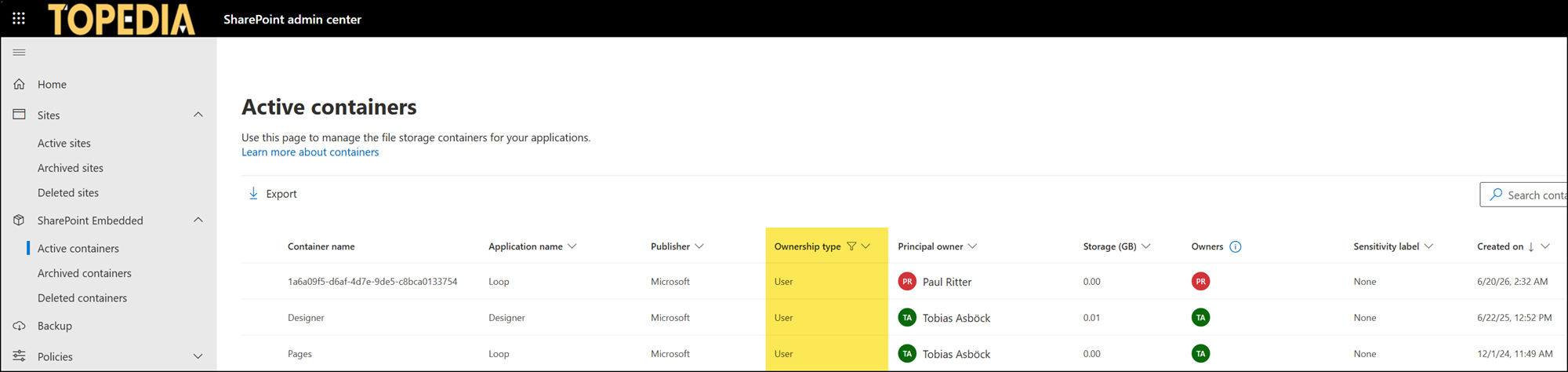
Each Notebook’s content is stored in user-owned SharePoint Embedded (SPE) containers shared with Microsoft Loop. These containers primarily use the “Loop” application in the SharePoint admin center (except for older containers), PowerShell, and Microsoft Purview. Their content counts toward the organization’s SharePoint storage quota. Administrators should include these containers in SharePoint storage usage reports.
In a typical case, a user has one user-owned SPE container, with various names depending on the product used to create the container, storing data from Loop services such as Designer, Copilot Pages, and now Copilot Notebooks. Loop components from Teams are still not stored in this container.
In some older cases, users have multiple user containers, as with my account. Microsoft adapted this in 2025, but administrators should be careful which container to modify in such cases. In a normal case, a user-owned container will be deleted if the user account is deleted. This should be considered for people who leave the organization, as their shared content is in the container.
If the Cloud Policy for Copilot Notebooks and Copilot Pages has never been updated, administrators should review the Cloud Policy settings. In the meantime, Microsoft provides a good summary on how to control Notebook creation. If not configured, the setting is enabled by default, and users can create new Notebooks.
