Microsoft is improving the file-opening experience in Microsoft 365 Copilot Chat on the web and Copilot Chat in Teams.
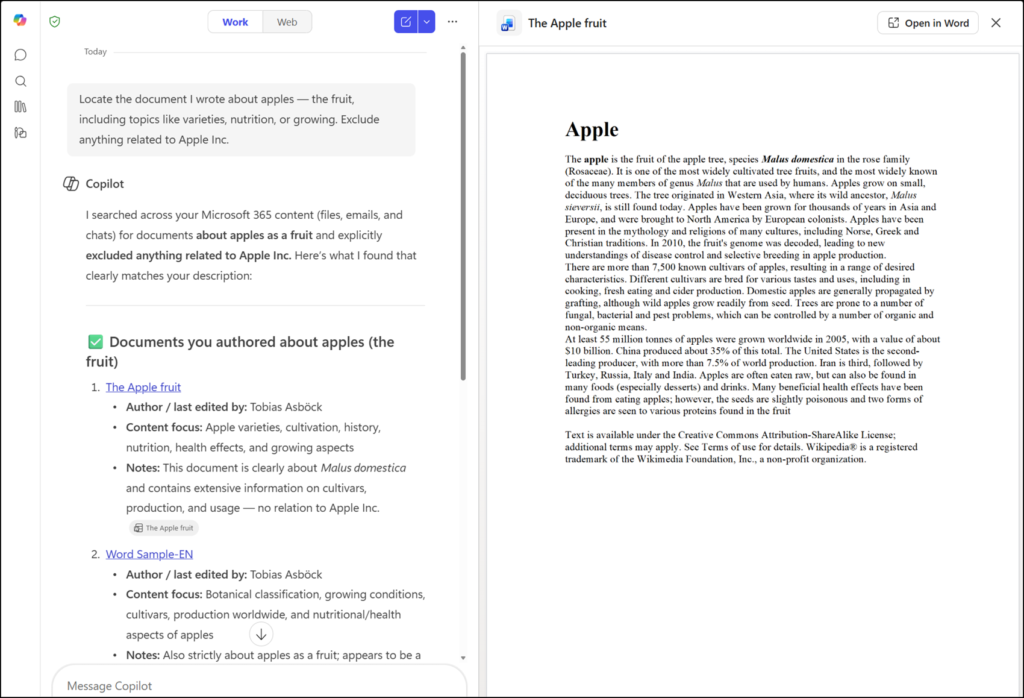
Previously, when users clicked a Word, Excel, or PowerPoint file in a Copilot Chat response, the file would open in a new browser tab.
With this update, supported files open directly within Copilot Chat, so users can review the referenced content without leaving the conversation. This makes it quicker to check the source behind a Copilot answer and stay focused on the current chat. It’s a read-only view; users cannot edit the document. They can then open the document in Office for the web as before.
- The update applies only to users with a Microsoft 365 Copilot license.
- The update applies to the Copilot Chat web experience and Copilot Chat in Teams, and affects how Word, Excel, and PowerPoint citations open. There is no change on other platforms, such as Copilot Mobile, Copilot in Edge, or Copilot in Word, Excel, and PowerPoint.
- The rollout should be completed in May 2026.