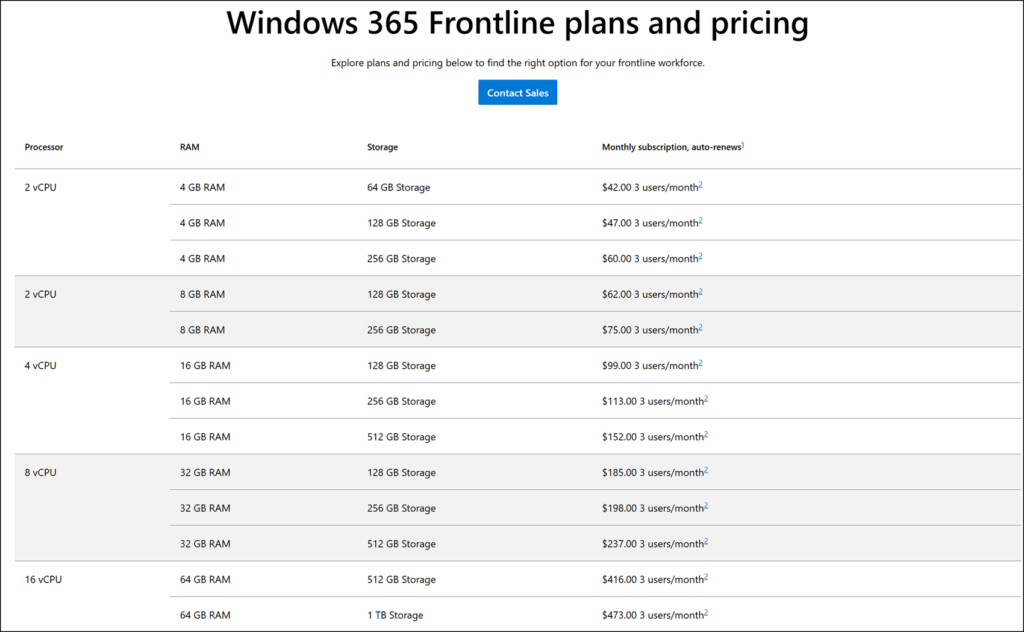
Microsoft has rebranded the Windows 365 Frontline product to Windows 365 Flex. The new name should reflect a broader purpose for the service, which now supports a wider range of working styles beyond the original frontline scenario. How the service works and how it is purchased remain unchanged.
Windows 365 Flex (and the formerly Windows 365 Frontline) is designed for employees who do not need a dedicated computer of their own, such as shift workers, part-time staff, seasonal employees, contractors, and anyone who only needs occasional or task-based access to a PC. Once users sign in, they immediately have access to their personalized resources, including their apps, data, desktops, and settings, so they can get straight to work.
Windows 365 Flex can be used in different ways depending on users’ needs.
- In Shared mode
Shared mode lets a single license provision one Cloud PC that can be shared non-concurrently among a group of users, with only one active session at a time. This makes it a cost-effective option when several people need occasional access but never at the same time.
Shared mode is designed for workers who need a Cloud PC for only short periods during the day to perform specialized tasks and do not require their data to persist between sessions. Each session can start from a fresh state, which keeps the experience consistent for every user.
Shared mode is particularly useful for customer-facing workers and external contractors, where access to a Cloud PC is occasional or task-based rather than continuous. - In Dedicated mode
Dedicated mode assigns a Cloud PC to a specific user, giving them a personal environment in which their apps, data, and settings persist across every session. This provides a consistent, tailored experience each time they sign in.
Dedicated mode can predict when a user typically connects and prestart their Cloud PC before they sign in, improving startup times and getting users productive more quickly. It is designed for workers who need regular access to the same Cloud PC but do not require it to be available full-time, such as part-time employees or staff who only work certain days of the week.
Dedicated mode is useful for part-time workers, seasonal staff, and employees in job-sharing arrangements, since each person benefits from a personalized Cloud PC without the cost of a dedicated full-time device.
Windows 365 Flex is available to organizations of any size as part of the Windows 365 family of Cloud PC services, and the existing Windows 365 Frontline licensing carries over to Windows 365 Flex.
The new name has already been updated in Microsoft’s documentation, but not yet in the licensing for the product ID CFQ7TTC0R595 (which I expect to be updated on 1 June). No action is required from users to continue using the service.