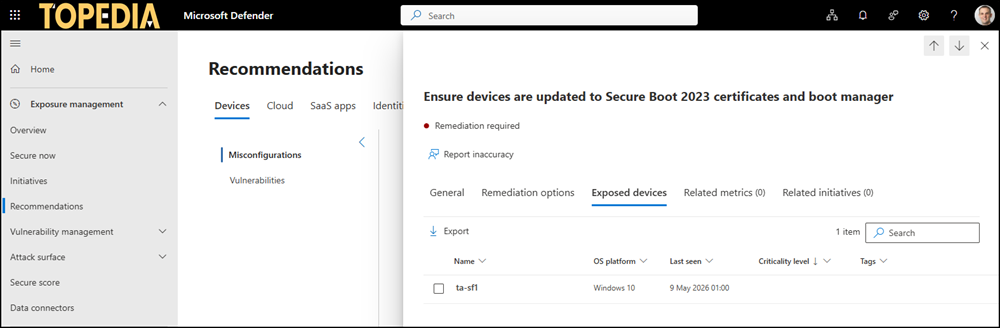
Microsoft Defender now helps organizations track which devices are not ready for the upcoming Secure Boot certificate transition.
A new assessment automatically reviews devices and classifies them as exposed if the updated certificates are missing. I was unable to find the other state ‘compliant’ and ‘not applicable’ for a compliant device. The exposed state should provide a clear picture of which devices still need attention before the older Secure Boot 2011 certificates start expiring in June 2026.
This change matters because devices still relying on the older certificates will no longer receive new security protections during early boot once those certificates expire. By migrating to the newer Windows UEFI CA 2023 certificates in time, users continue to benefit from up-to-date protection against threats that target the earliest stages of device startup, helping keep their devices secure without interruption.
The impact of Secure Boot certificate expiration
Microsoft is updating the Secure Boot certificates originally issued in 2011 to ensure Windows devices continue to verify trusted boot software. These older certificates begin expiring in June 2026. Devices that have not received the newer 2023 certificates will continue to start and operate normally, and standard Windows updates will continue to install. However, these devices will no longer be able to receive new security protections for the early boot process, including updates to Windows Boot Manager, Secure Boot databases, revocation lists, or mitigations for newly discovered boot-level vulnerabilities.
Over time, this limits the device’s protection against emerging threats and may affect scenarios that rely on Secure Boot trust, such as BitLocker hardening or third-party bootloaders. Most Windows devices will receive the updated certificates automatically, and many OEMs provide firmware updates when needed. Keeping your device current with these updates helps ensure it can continue to receive the full set of security protections that Secure Boot is designed to provide.
I also described my personal experience in February and explained how to update Secure Boot certificates via registry keys or Intune. The experience was based on an Intune report.
With the new Secure Boot certificate assessment, you may discover additional onboarded devices connecting to your tenant not part of Entra ID or Intune. I found such a device, which I rarely start up just to quickly check something (and which cannot be updated to Windows 11 due to Microsoft’s update restrictions 🤬).
License add-on required!
You may need the Defender Vulnerability Management add-on (product ID CFQ7TTC0JPGV) or Defender for Endpoint Plan 2 (product ID CFQ7TTC0LGV0) in your tenant, at least one license; otherwise, the Devices tab in Exposure Management is hidden, and you cannot access the Secure Boot recommendation. Microsoft does not clearly state which license is required.
Open the Defender admin portal > Exposure management > Recommendations > Devices and look for “Ensure devices are updated to Secure Boot 2023 certificates and boot manager“. Open the recommendation and select the exposed devices tab to get insights about devices with the missing Secure Boot certificates.