
Microsoft is updating the Microsoft-managed default user consent policy for Microsoft Graph as part of the Secure Future Initiative (SFI). The change should increase administrator control over third-party application access to Exchange data by requiring admin consent for an expanded set of Graph delegated permissions.
Important:
This update only affects tenants using the Microsoft-managed user consent policies. Organizations using a custom or admin-defined policy are not affected.
Timeline
The rollout should be completed by July 2026.
How does this affect organizations?
Last year, Microsoft introduced two new Microsoft-managed app consent policies.
The following eight Microsoft Graph delegated permissions will be added to the Microsoft-managed app consent policy, meaning admin consent will be required by default for third-party apps requesting them to access Exchange data:
- Contacts.ReadWrite
- Contacts.Read.Shared
- Contacts.ReadWrite.Shared
- People.Read
- Tasks.Read
- Tasks.ReadWrite
- Tasks.Read.Shared
- Tasks.ReadWrite.Shared
Users will no longer be able to grant consent for these permissions on their own unless the requesting app is included in the Mail client policy (a second Microsoft-managed policy), which will continue to allow user consent for approved, popular mail applications covering the permissions in the recommended user consent policy.
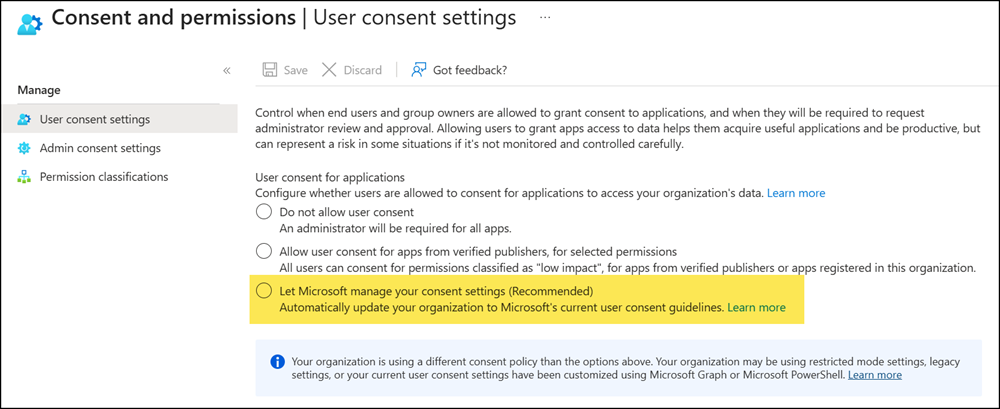
Administrators should review the option in their app consent policy.
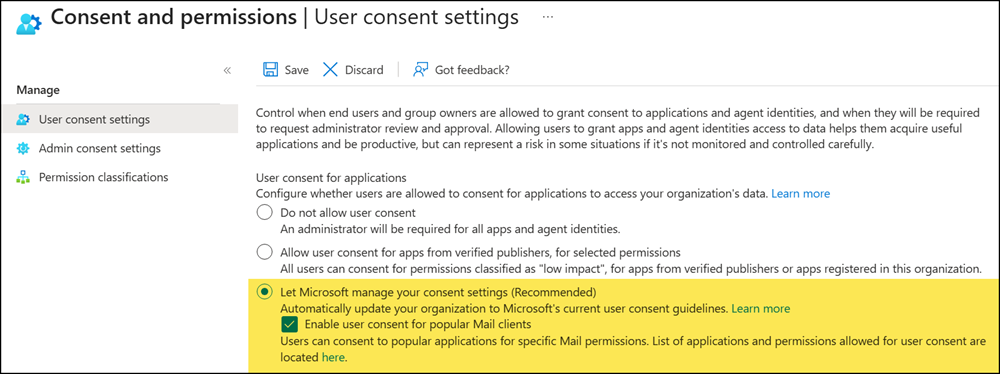
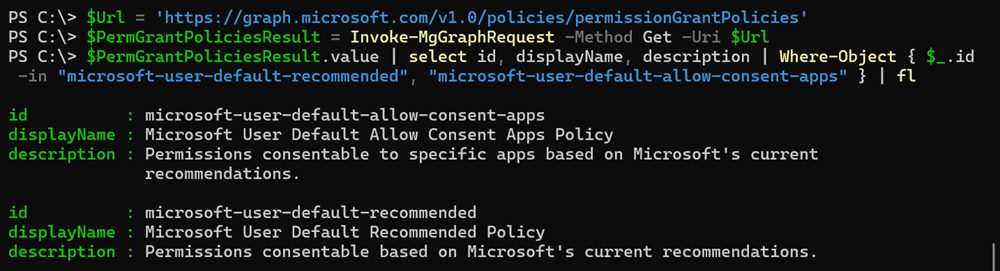
If the option “Enable user consent for popular Mail clients” is enabled, the tenant uses the Microsoft-managed app consent policy microsoft-user-default-allow-consent-apps (previously mentioned as the mail client policy). If this option is disabled, the tenant is using the microsoft-user-default-recommended policy, introduced in August 2025.
- Organizations using custom user consent policies are not affected. My July 2025 post provides step-by-step guidance on creating a custom app consent policy.
- Users who have already granted consent to an app can continue using it without interruption.
- New users or apps requesting new or broader permissions are blocked, depending on the app’s consent policy. Microsoft recommends configuring an admin consent workflow to manage these requests.
My table lists all 36 permissions that are or will be excluded by the microsoft-user-default-recommended policy.
- The Microsoft Graph resource ID is 00000003-0000-0000-c000-000000000000.
- The Office 365 Exchange Online resource ID is 00000002-0000-0ff1-ce00-000000000000.
Last updated: May 2026
| Resource | PermissionType | Permission | ConsentDisplayName | ConsentDescription | Excluded |
|---|---|---|---|---|---|
| Microsoft Graph | User | Contacts.ReadWrite | Have full access of your contacts | Allows the app to read, update, create and delete contacts in your contact folders. | June 2026 |
| Microsoft Graph | User | Contacts.Read.Shared | Read your and shared contacts | Allows the app to read contacts you have permissions to access, including your own and shared contacts. | June 2026 |
| Microsoft Graph | User | Contacts.ReadWrite.Shared | Read and write to your and shared contacts | Allows the app to read, update, create, and delete contacts you have permissions to access, including your own and shared contacts. | June 2026 |
| Microsoft Graph | User | People.Read | Read your relevant people list | Allows the app to read a list of people in the order that's most relevant to you. This includes your local contacts, your contacts from social networking, people listed in your organization's directory, and people from recent communications. | June 2026 |
| Microsoft Graph | User | Tasks.Read | Read your tasks and task lists | Allows the app to read your tasks and task lists, including any shared with you. Doesn't include permission to create, delete, or update anything. | June 2026 |
| Microsoft Graph | User | Tasks.ReadWrite | Create, read, update, and delete your tasks and task lists | Allows the app to create, read, update, and delete your tasks and task lists, including any shared with you. | June 2026 |
| Microsoft Graph | User | Tasks.Read.Shared | Read your and shared tasks | Allows the app to read tasks you have permissions to access, including your own and shared tasks. | June 2026 |
| Microsoft Graph | User | Tasks.ReadWrite.Shared | Read and write to your and shared tasks | Allows the app to read, update, create, and delete tasks you have permissions to access, including your own and shared tasks. | June 2026 |
| Office 365 Exchange Online | User | EAS.AccessAsUser.All | Access your mailboxes | Allows the app full access to your mailboxes on your behalf. | November 2025 |
| Office 365 Exchange Online | User | EWS.AccessAsUser.All | Access your mailboxes | Allows the app full access to your mailboxes on your behalf. | November 2025 |
| Office 365 Exchange Online | User | POP.AccessAsUser.All | Read and write access to your mail | Allows the app to read, update, create and delete email in your mailbox. Does not include permission to send mail. | November 2025 |
| Office 365 Exchange Online | User | IMAP.AccessAsUser.All | Read and write access to your mail | Allows the app to read, update, create and delete email in your mailbox. Does not include permission to send mail. | November 2025 |
| Microsoft Graph | User | Calendars.Read | Read your calendars | Allows the app to read events in your calendars. | November 2025 |
| Microsoft Graph | User | Calendars.Read.Shared | Read calendars you can access | Allows the app to read events in all calendars that you can access, including delegate and shared calendars. | November 2025 |
| Microsoft Graph | User | Calendars.ReadBasic | Read basic details of your calendars | Allows the app to read events in your calendars, except for properties such as body, attachments, and extensions. | November 2025 |
| Microsoft Graph | User | Calendars.ReadWrite | Have full access to your calendars | Allows the app to read, update, create and delete events in your calendars. | November 2025 |
| Microsoft Graph | User | Calendars.ReadWrite.Shared | Read and write to your and shared calendars | Allows the app to read, update, create and delete events in all calendars in your organization you have permissions to access. This includes delegate and shared calendars. | November 2025 |
| Microsoft Graph | User | Chat.Read | Read your chat messages | Allows an app to read your 1 on 1 or group chat messages in Microsoft Teams, on your behalf. | November 2025 |
| Microsoft Graph | User | Chat.ReadWrite | Read and write your chat messages | Allows an app to read and write your 1 on 1 or group chat messages in Microsoft Teams, on your behalf. | November 2025 |
| Microsoft Graph | User | Mail.Read | Read your mail | Allows the app to read email in your mailbox. | November 2025 |
| Microsoft Graph | User | Mail.Read.Shared | Read mail you can access | Allows the app to read mail you can access, including shared mail. | November 2025 |
| Microsoft Graph | User | Mail.ReadBasic | Read user basic mail | Allows the app to read email in the signed-in user's mailbox except body, previewBody, attachments and any extended properties. | November 2025 |
| Microsoft Graph | User | Mail.ReadBasic.Shared | Read basic mail you can access | Allows the app to read mail you can access, including shared mail except body, previewBody, uniqueBody, attachments, extensions, and any extended properties. | November 2025 |
| Microsoft Graph | User | Mail.ReadWrite | Read and write access to your mail | Allows the app to read, update, create and delete email in your mailbox. Does not include permission to send mail. | November 2025 |
| Microsoft Graph | User | Mail.ReadWrite.Shared | Read and write mail you can access | Allows the app to read, update, create, and delete mail you have permission to access, including your own and shared mail. Does not allow the app to send mail on your behalf. | November 2025 |
| Microsoft Graph | User | MailboxFolder.Read | Read your mailbox folders | Allows the app to read your mailbox folders, on your behalf | November 2025 |
| Microsoft Graph | User | MailboxFolder.ReadWrite | Read and write your mailbox folders | Allows the app to read and write your mailbox folders, on your behalf | November 2025 |
| Microsoft Graph | User | MailboxItem.Read | Read your mailbox items | Allows the app to read your mailbox items, on your behalf | November 2025 |
| Microsoft Graph | User | MailboxSettings.Read | Read your mailbox settings | Allows the app to read your mailbox settings. | November 2025 |
| Microsoft Graph | User | MailboxSettings.ReadWrite | Read and write to your mailbox settings | Allows the app to read, update, create, and delete your mailbox settings. | November 2025 |
| Microsoft Graph | User | OnlineMeetings.Read | Read your online meetings | Allows the app to read online meeting details on your behalf. | November 2025 |
| Microsoft Graph | User | OnlineMeetings.ReadWrite | Read and create your online meetings | Allows the app to read and create online meetings on your behalf. | November 2025 |
| Microsoft Graph | User | Files.Read.All | Read all files that you have access to | Allows the app to read all files you can access. | August 2025 |
| Microsoft Graph | User | Files.ReadWrite.All | Have full access to all files you have access to | Allows the app to read, create, update and delete all files that you can access. | August 2025 |
| Microsoft Graph | User | Sites.Read.All | Read items in all site collections | Allow the application to read documents and list items in all site collections on your behalf | August 2025 |
| Microsoft Graph | User | Sites.ReadWrite.All | Edit or delete items in all site collections | Allow the application to edit or delete documents and list items in all site collections on your behalf. | August 2025 |
