
Microsoft has published the new Teams Events capacity packs and the updated Teams Shared Space license on 1 April.
Content
New licenses
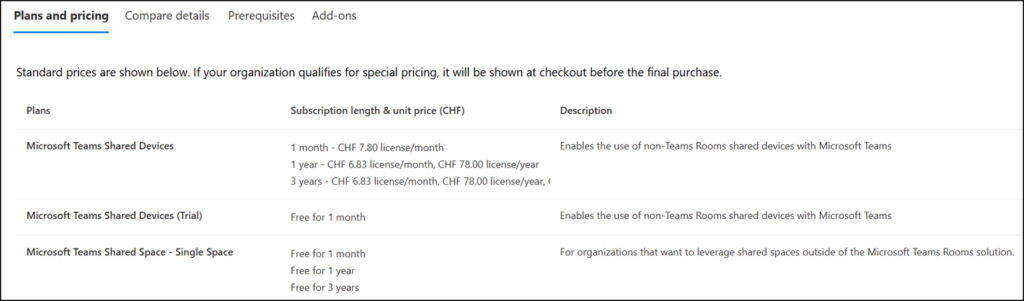
Microsoft Teams Shared Space
As announced in January, the current Microsoft Teams Shared Devices license is being renamed to Microsoft Teams Shared Space.
The renamed Microsoft Teams Shared Space (MTSS) license is a Teams add-on that supports hybrid work by enabling organizations to designate devices as shared. Supported device types include common area phones, desk docks for bookable desks, and Teams panels for meeting spaces. The Product ID is CFQ7TTC0LH0V.
The new Microsoft Teams Shared Space – Single Space (MTSS-SS) license is a Teams add-on that can be used for bookable desks, BYOD rooms, and space analytics. The Product ID is also CFQ7TTC0LH0V.
- When a Teams Shared Space license is provisioned for a bookable desk or a bring-your-own-device (BYOD) room, the admin will see three additional $0 Microsoft Teams Shared Space – Single Space licenses available for assignment to three additional bookable desks or BYOD rooms. Organizations can acquire three free MTSS-SS licenses for each purchased MTSS license.
- If a Microsoft Teams Shared Space license is already assigned to a bookable desk’s dock device or a BYOD room’s Teams panel device, no additional Microsoft Teams Shared Space – Single Space license is required.
- The MTSS-SS license includes Intune Plan 1, Exchange Online Plan 2 (Cloud-based voicemail capabilities only), Specialty devices, and Managed Space.
- A Teams Phone plan is not included in MTSS-SS.
Users can continue to book rooms and workspaces (also known as desk pools) without an MTSS license.
MTSS licenses are required for…
- Individual desks
- BYOD rooms
- Autorelease and analytics for rooms and desks
MTSS licenses should be assigned to bookable desk or BYOD room accounts, not to individual users.
Places Premium features for Teams Premium users
Users with a Teams Premium license obtained before 1 April 2026 can book any desk and can continue to do so until renewal. Individual bookable desks require a Teams Shared Space license, so users without a legacy Teams Premium license can book them.
Teams Events Attendee Packs
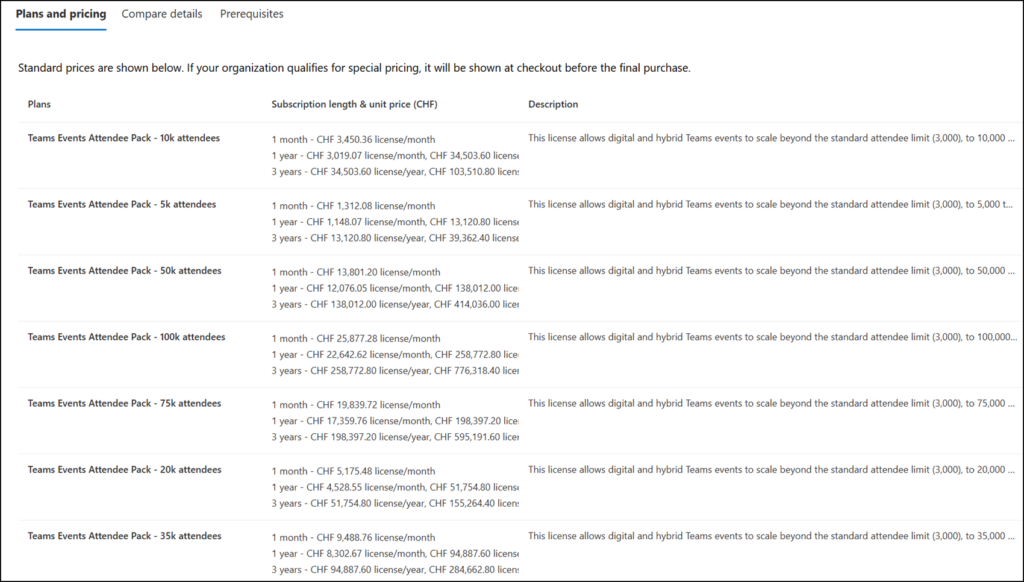
Microsoft has introduced new attendee capacity packs for Teams Events in seven sizes, scaling the standard interactive attendee limit from 3,000 (included) up to 100,000 attendees (with capacity pack).
According to the documentation, the 3,000 attendee limit and all capacity packs apply only to Town Hall events. Meetings remain limited to 1,000 interactive attendees and 10,000 view-only attendees. The Product ID is CFQ7TTBZZJP0.
- Teams Events Attendee Pack – 5k attendees
- Teams Events Attendee Pack – 10k attendees
- Teams Events Attendee Pack – 20k attendees
- Teams Events Attendee Pack – 35k attendees
- Teams Events Attendee Pack – 50k attendees
- Teams Events Attendee Pack – 75k attendees
- Teams Events Attendee Pack – 100k attendees
As mentioned in my March post, the event organizer needs the capacity pack. The capacity pack defines the maximum event capacity. An account can hold only one capacity pack. Assigning multiple packs to a single account does not increase the total capacity.
Teams Premium licenses purchased before April 2026
Organizations that purchased Teams Premium licenses before 1 April 2026 can continue to access all previously included Teams Premium features and product experiences until their licenses expire or are renewed, including up to 100k interactive attendees without an additional capacity pack. After renewal or without a Teams Premium license, users with a Microsoft Teams Enterprise license can host town hall events with up to 3,000 interactive or 10,000 view-only attendees. The eCDN add-on is now included in the Teams Enterprise license.
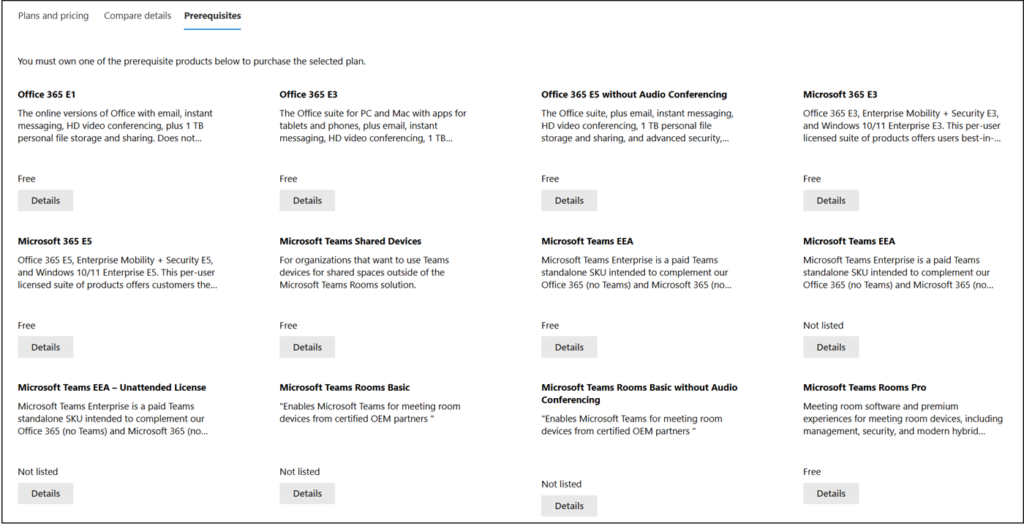
The prerequisite for the attendee capacity pack is an Enterprise, Teams Shared Space, or Teams Rooms license.
Microsoft Cloud Promotions
My updates to promotional offers.
Last updated: 1 April 2026| Product | Product ID | Promo Offer | MinSeats | MaxSeats | StartDate | EndDate | Notes | |
|---|---|---|---|---|---|---|---|---|
| Microsoft Entra | Microsoft Entra Suite | CFQ7TTC0NZT8 | 50% | 10 | 300 | 01.10.2025 | 31.03.2026 | Expired |
| Microsoft Entra Suite Add-on for Entra ID P2 | ||||||||
| Microsoft 365 Copilot | Microsoft 365 Copilot - 15% off (new Copilot customers) | CFQ7TTC0MM8R | 15% | 1 | 10 | 01.10.2025 | 30.06.2026 | |
| Microsoft 365 Copilot Business | CFQ7TTC0MM8R | 15% | 1 | 300 | 01.12.2025 | 30.06.2026 | Extended previously 31.03.2026 |
|
| Microsoft 365 Business Premium and Microsoft 365 Copilot Business | CFQ7TTC0LCHC | 25% | 1 | 300 | ||||
| Microsoft 365 Business Standard and Microsoft 365 Copilot Business | CFQ7TTC0LDPB | 35% | 1 | 300 | ||||
| Windows 365 | Windows 365 Enterprise | CFQ7TTC0HHS9 | 20% | 1 | 10 million | 01.05.2025 | 30.04.2026 | |
| Windows 365 Business | CFQ7TTC0J203 | |||||||
| Windows 365 Frontline | CFQ7TTC0R595 | |||||||
| Windows 365 Cross Region Disaster Recovery | CFQ7TTC0SWNG | |||||||
| Windows 365 Disaster Recovery Plus | CFQ7TTC11SSF | |||||||
| Microsoft Purview | Microsoft Purview Suite (new seats only, in combination with M365 Copilot) | CFQ7TTC0LHR4 | 50% | 1 | 10 million | 01.02.2026 | 30.06.2026 | Extended previously 31.01.2026 |
| Purview Suite for Microsoft 365 Business Premium (just for Business, only in combination with M365 Copilot or M365 Copilot Business) | CFQ7TTC0LCHC | 50% | 1 | 300 | 01.12.2025 | 30.06.2026 | Extended previously 31.03.2026 |
|
| Dynamics 365 | Dynamics 365 Customer Service Premium | CFQ7TTC0TDKX | 40% | 1 | 10 million | 01.10.2025 | 30.06.2026 | |
| Dynamics 365 Contact Center Voice | CFQ7TTC0TDL7 | |||||||
| Dynamics 365 Contact Center | CFQ7TTC0TDLC | |||||||
| Dynamics 365 Project Operations (3-year term only) | CFQ7TTC0HD4D | 30% | 1 | 10 million | 01.01.2026 | 31.12.2027 | Reduced to 30% previously 40% |
|
| Dynamics 365 Human Resources (3-year term only) | CFQ7TTC0HD4G | |||||||
| Dynamics 365 Customer Service Enterprise (3-year term only) | CFQ7TTC0LFDZ | |||||||
| Dynamics 365 Sales Enterprise (3-year term only) | CFQ7TTC0LFF1 | |||||||
| Dynamics 365 Sales Professional (3-year term only) | CFQ7TTC0LFN5 | |||||||
| Dynamics 365 Team Members (3-year term only) | CFQ7TTC0LFNJ | |||||||
| Dynamics 365 Customer Service Professional (3-year term only) | CFQ7TTC0LFNK | |||||||
| Dynamics 365 Field Service (3-year term only) | CFQ7TTC0LFNL | |||||||
| Dynamics 365 Finance (3-year term only) | CFQ7TTC0LGV4 | |||||||
| Dynamics 365 Commerce (3-year term only) | CFQ7TTC0LH2Z | |||||||
| Dynamics 365 Supply Chain Management (3-year term only) | CFQ7TTC0LH31 | |||||||
| Dynamics 365 Operations – Device (3-year term only) | CFQ7TTC0LHVJ | |||||||
| Dynamics 365 Operations – Activity (3-year term only) | CFQ7TTC0LHX0 | |||||||
| Dynamics 365 Finance Premium (3-year term only) | CFQ7TTC0NL21 | |||||||
| Dynamics 365 Supply Chain Management Premium (3-year term only) | CFQ7TTC0P17W |
