Microsoft 365 Copilot Chat is getting a practical upgrade that makes email composition faster and more seamless. Users will soon be able to draft, edit, and send Outlook emails without leaving Copilot Chat.
When Copilot detects that a user intends to write an email, an embedded Outlook compose form opens directly in the chat interface, allowing users to adjust message content, modify recipients, and send the email from that same window. If they prefer to continue working in Outlook, they can open the draft there instead.
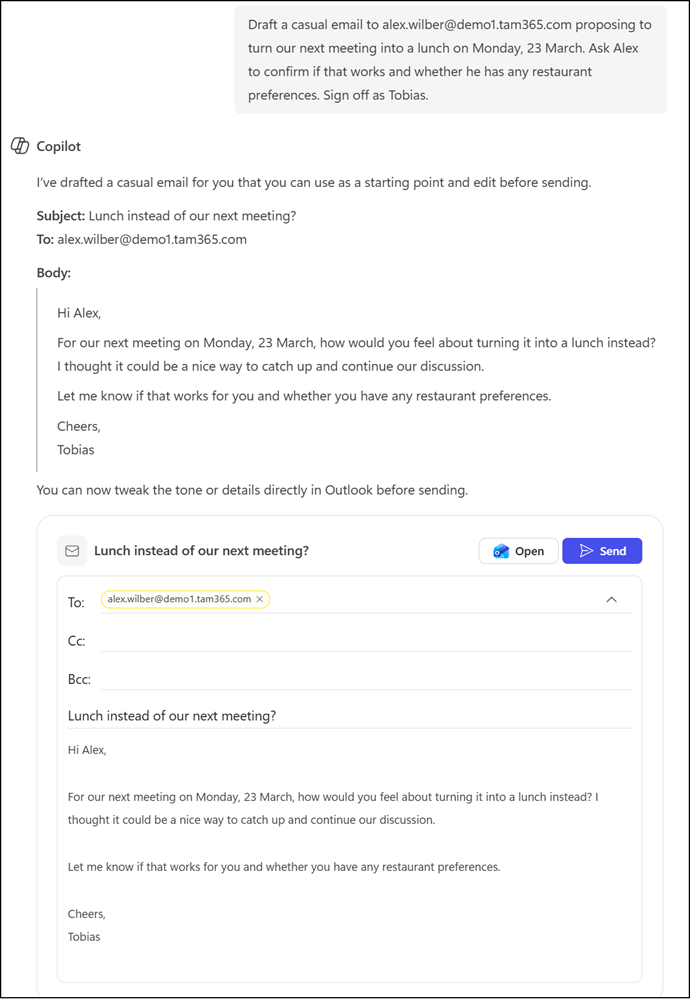
This update should remove the need to switch between apps for everyday email tasks, keeping communication workflows more focused and efficient.
- The feature requires a Microsoft 365 Copilot license and an Exchange Online mailbox.
- It is currently supported in the Copilot Chat desktop experience (such as the Copilot Chat web app and Copilot Chat in Teams).
- It is not available in the Copilot Chat mobile app or the chat sidebar (such as in Microsoft Edge).
The rollout should be completed by late April 2026, currently covering the desktop app experience.