
Microsoft has released an update to Outlook Mobile on iOS that lets users save Outlook calendar events as drafts in the mobile app. This capability was already available in Outlook for desktop and Outlook on the web.
A draft event is created when meeting details are not yet finalized. This feature gives organizers more flexibility by preserving unfinished meeting items on the calendar without sending invitations.
Timeline
The feature was scheduled for August 2025, postponed several times, and is now available in Outlook for iOS build 5.2605.0, released a few days ago.
How does this affect your users?
The Drafts feature for Outlook calendar events allows users to keep tentative meetings on their calendars without sending invitations prematurely. Saving draft events is already available in Outlook for desktop and Outlook on the web.
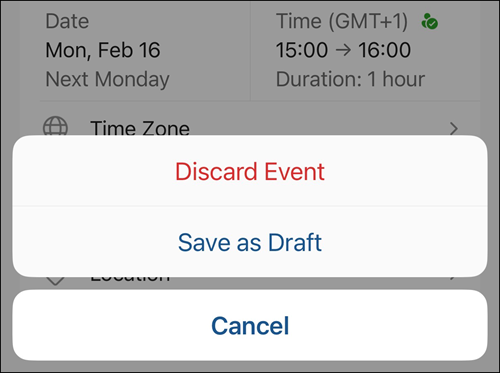
When users create a meeting in the Outlook Mobile app for iOS and add at least one attendee, they will see options to either discard the event or use the newly added “Save as Draft” option.
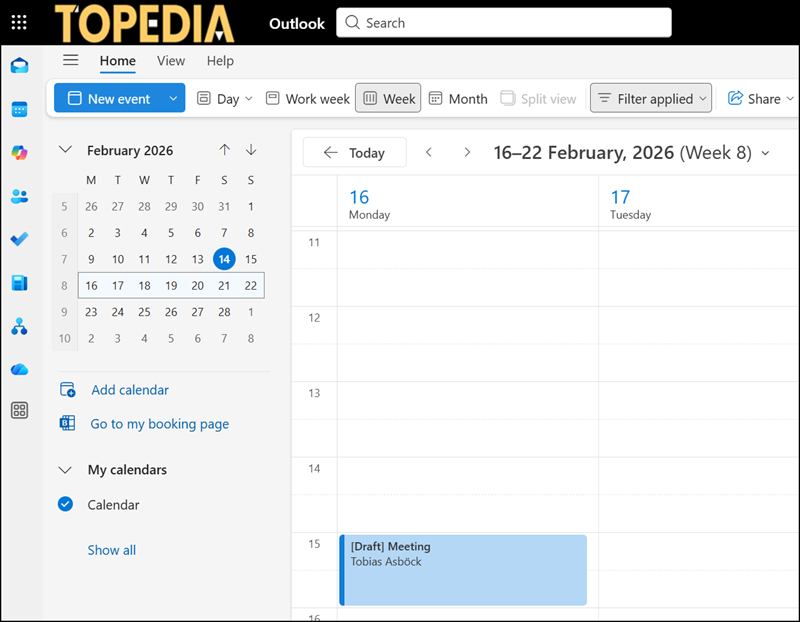
Saved draft events appear on the calendar with a “[Draft]” prefix added to the event title, allowing organizers to quickly identify incomplete items. The prefix is not displayed in Outlook Mobile, but the event is still marked as a draft when you open it. Draft events are visible across mobile devices, Outlook for desktop, and Outlook on the web.
Users can modify or delete draft events at any time. The “[Draft]” prefix is automatically removed once the meeting invitation is sent.
