
Microsoft Teams for Desktop and Web is getting a new setting that controls the behavior of the Enter key while writing a message. This update should help to prevent accidental message sends and aligns Teams with the behavior of other messaging applications, resulting in a more predictable compose experience.
- The default behavior remains Enter to send, with an option to switch Enter to insert a new line instead.
- This setting only applies when the user is not in formatting mode.
Timeline
The rollout should be completed in March 2026.
What is changing?
After the rollout, users will see a contextual hint in the compose box indicating that Shift+Enter (or Cmd+Enter on macOS) inserts a new line.

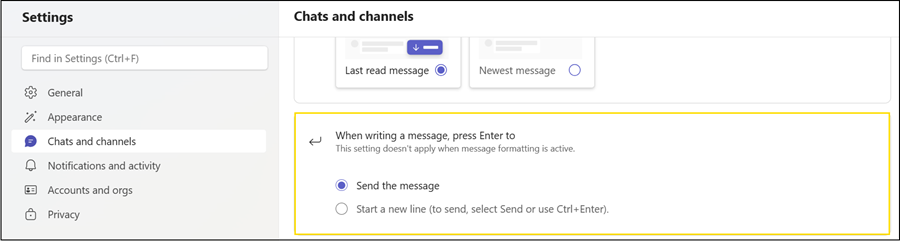
When this hint appears, users can configure the new Teams setting to define how the Enter key in Teams behaves.
The available options are:
- Enter sends the message: This is the default configuration for all users.
- Enter starts a new line: When this option is selected, Ctrl+Enter sends the message instead.
- Shift+Enter always starts a new line, regardless of the configured option.
- All of the above applies only when the user is not in formatting mode.
In both configurations, contextual hints are displayed near the compose box to remind users of the active behavior, as shown in the first screenshot above.
Based on my testing, this setting is stored locally and does not roam across platforms. A change made in the Teams Desktop client on Windows is not transferred to Teams Web.
