
Microsoft is retiring Context IQ suggestions in the new Outlook for Windows and Outlook on the web. This feature currently allows users to insert suggested files and other content by simply typing “/” while composing an email.
Timeline
Retirement begins on Monday, 16 March 2026.
How does this affect your users?
Microsoft introduced Context IQ in October 2022 for Outlook and Word on the web.
Context IQ is a new set of capabilities from Microsoft that intelligently connects you with the information you need, where and when you need it. By working in the background to connect your content across various Microsoft apps and services, Context IQ’s in-context suggestions save you time and let you stay in the flow as you work.
In practice, users can type “/” to trigger a list of suggested documents directly in their email draft.
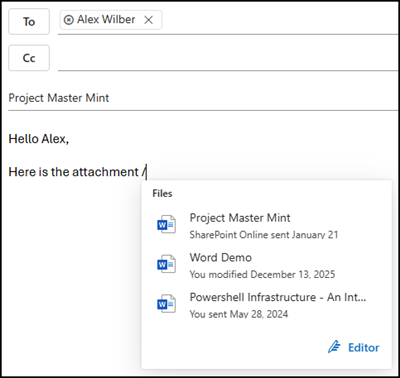
This feature is more of an interruption than a help, often appearing at the wrong time and offering irrelevant suggestions. Its removal will likely result in a cleaner, less cluttered writing experience.
Moving forward, users can achieve the same results through several standard methods:
Users can manually copy and paste a sharing link directly into the email body, drag and drop files from their folders into the compose window, or simply use the standard Attach File menu to browse through their recent content and cloud files.
Note, while Context IQ “/” suggestions are being phased out, Microsoft Editor settings remain available. Unfortunately, Editor often has the same frustrating experience as Context IQ suggestions.
