
Code blocks are now available in Teams Mobile

Microsoft has enhanced support for viewing code blocks in the Teams mobile app for iOS and Android. This update improves the mobile collaboration experience by enabling proper rendering of code blocks, a capability previously missing and mentioned when the legacy code snippets feature was retired.

Timeline

The rollout should be completed in February 2026.

How does this affect your users?

Teams Mobile now displays code blocks sent from Teams desktop or web clients in view-only mode. Microsoft previously mentioned this capability during the retirement of code snippets in April 2025.

Read:  The "Code snippets" feature for Teams chats and channels will be retired

Code blocks appear as a dedicated message object, similar to a file preview, optimized for smaller screens. Tapping the preview opens a full-screen reader with syntax highlighting, line numbers, and scrollable containers for longer snippets.
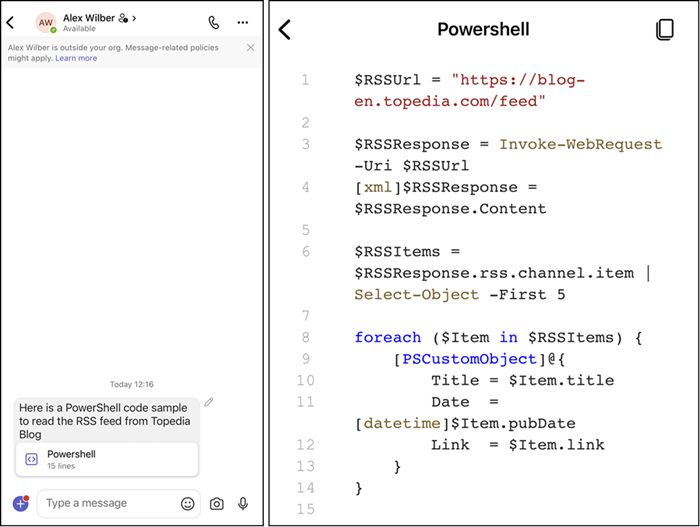

Code blocks in Teams Mobile
Share
Avatar photo

Tobias Asböck

Tobias is a Senior System Engineer with more than 10 years of professional experience with Microsoft 365 products such as SharePoint Online, SharePoint Premium, OneDrive for Business, Teams Collaboration, Entra ID, Information Protection, Universal Print, and Microsoft 365 Licensing. He also has 15+ years of experience planning, administering, and operating SharePoint Server environments. Tobias is a PowerShell Scripter with certifications for Microsoft 365 products. In his spare time, Tobias is busy with updates in the Microsoft 365 world or on the road with his road bike and other sports activities. If you have additional questions, please contact me via LinkedIn or [email protected].

Leave a Reply

Your email address will not be published. Required fields are marked *