
Microsoft is expanding the new Power Platform Inventory to include all Power Automate flows, Copilot flows, and Copilot Studio Lite agents available in your tenant.
Content
Timeline
The rollout should be completed by 20 December 2025.
What is new?
Power Platform administrators now find the following new items in the inventory, in addition to the previously available items:
- Agents from Copilot Studio Lite (formerly known as Agent Builder).
- Flows from the Workflows Agent in Microsoft 365 Copilot, which is still in the Frontier program.
- Agent flows from Copilot Studio.
- Cloud flows from Power Automate.
The Power Platform Inventory provides a consolidated view of key information for each item, including:
- Name
- Item type
- Owner
- Last modified date
- Who modified the item
- Creation date
- Who created the item
- Environment
- Environment type (Production, Sandbox, Developer, …)
- Environment ID
- Environment region
- Whether the environment is managed
Keep in mind, changes to resources (create, update, or delete) are reflected with a latency of up to 15 minutes.
Basic insights into Copilot Studio Lite agents
You now also gain insight into which Power Platform environment your Copilot Studio Lite agents are stored in, which was previously a black box.
However, there is a limitation:
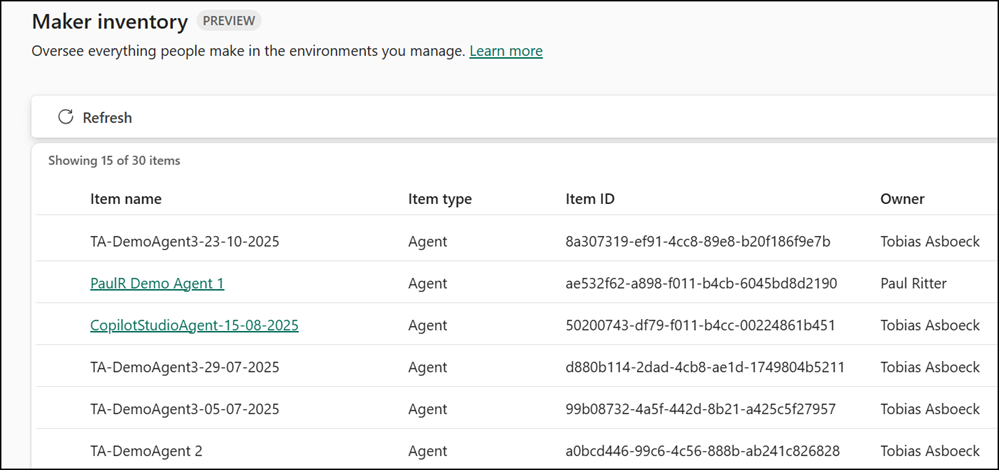
Both Lite and Full agents are classified simply as “Agent”. The difference is that a Power Platform administrator can open agents created in Copilot Studio Full, but cannot open agents created in Copilot Studio Lite (at least not yet). You can see this in the screenshot: the underlined agents can be opened, the others cannot.
Another notable point:
Microsoft still has not implemented its third announcement (April, May, and September 2025) to store Copilot Studio Lite agents in a dedicated Power Platform environment. I wrote in October that it remains unclear where these agents are stored. With the new inventory, this information is now visible.
To verify, I created a new Copilot Studio Lite agent. The agent is still created in the default environment.

Advanced insights with the Power Platform Inventory API
The newly added items make it much easier to get a complete overview of your Power Platform inventory. You can also access this data programmatically through the Power Platform Inventory API. I recently explained how to work with the API using PowerShell.
Copilot Agents
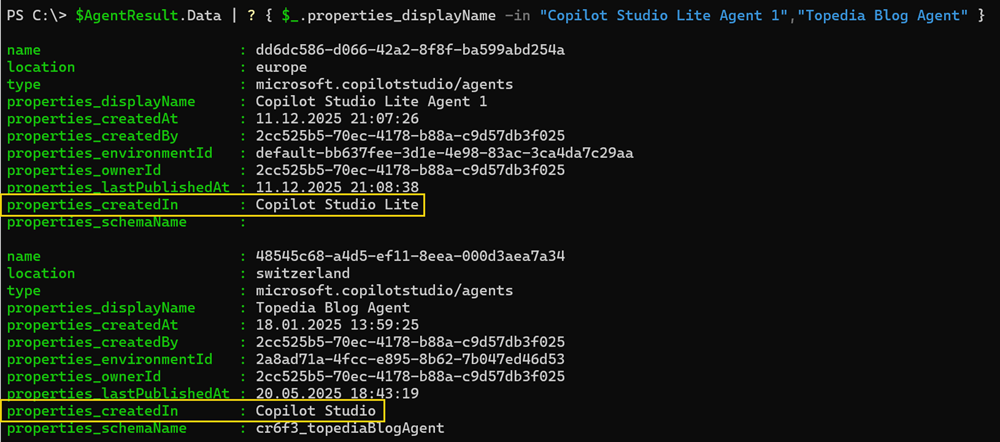
The API also provides details indicating whether an agent is a Lite or Full agent. Here is an example output:
Here is the KQL query in JSON format to list your Copilot Studio agents with PowerShell:
# Filter the Power Platform Inventory for Copilot Studio agents

@"
{
  "TableName": "PowerPlatformResources",
  "Clauses": [
    {
      "`$type": "where",
      "FieldName": "type",
      "Operator": "==",
      "Values": ["'microsoft.copilotstudio/agents'"]
    },
    {
      "`$type": "project",
      "FieldList": [
        "name",
        "location",
        "type",
        "properties.displayName",
        "properties.createdAt",
        "properties.createdBy",
        "properties.environmentId",
        "properties.ownerId",
        "properties.lastPublishedAt",
        "properties.createdIn",
        "properties.schemaName"
      ]
    },
    {
      "`$type": "take",
      "TakeCount": 1000
    }
  ]
}
"@Power Automate and Copilot flows
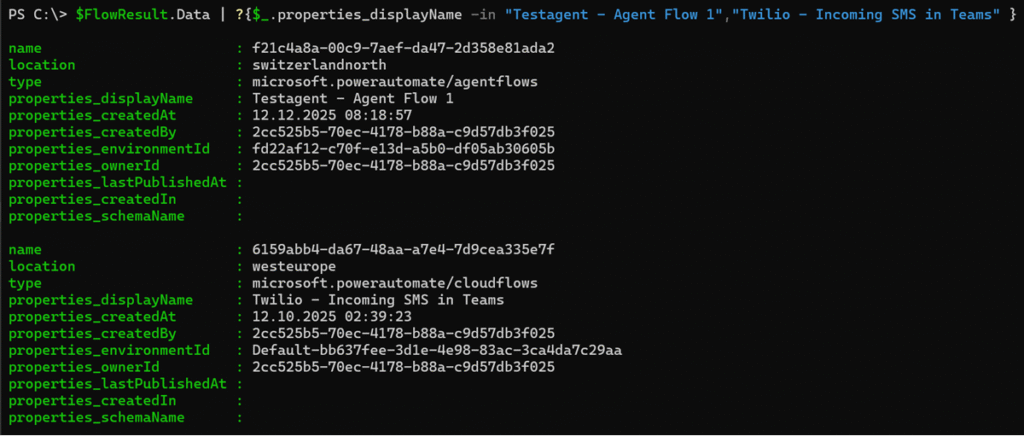
You can also filter flows from the Workflows Agent in Microsoft 365 Copilot (type: m365agentflows), agent flows from Copilot Studio (type: agentflows), and cloud flows from Power Automate (type: cloudflows). I am unable to simulate a Workflows Agent flow in my current setup because the agent requires a Copilot license.
Here is the KQL query in JSON format to list your flows with PowerShell:
# Filter the Power Platform Inventory for cloudflows, m365agentflows, and agentflows

@"
{
  "TableName": "PowerPlatformResources",
  "Clauses": [
    {
      "`$type": "where",
      "FieldName": "type",
      "Operator": "in~",
      "Values": [
        "'microsoft.powerautomate/cloudflows'",
        "'microsoft.copilotstudio/m365agentflows'",
        "'microsoft.powerautomate/agentflows'"
      ]
    },
    {
      "`$type": "project",
      "FieldList": [
        "name",
        "location",
        "type",
        "properties.displayName",
        "properties.createdAt",
        "properties.createdBy",
        "properties.environmentId",
        "properties.ownerId",
        "properties.lastPublishedAt",
        "properties.createdIn",
        "properties.schemaName"
      ]
    },
    {
      "`$type": "take",
      "TakeCount": 1000
    }
  ]
}
"@