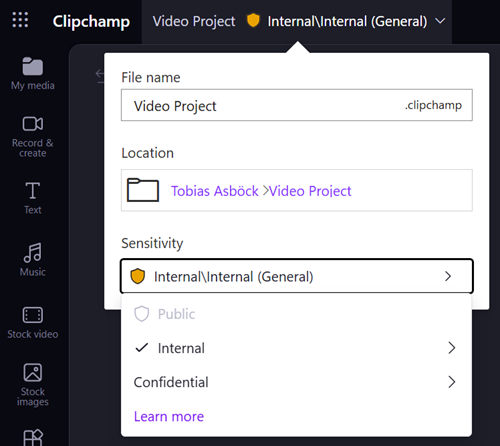
Microsoft is expanding the scope of the SharePoint setting EnableSensitivityLabelForVideoFiles, which has been in public preview since June 2026. The setting currently controls sensitivity label support for MP4 files only and will also control sensitivity label behavior for Clipchamp project files (*.clipchamp).
- This update does not change how sensitivity labels behave on MP4 files stored directly in SharePoint or OneDrive.
- This update can affect existing Clipchamp projects in SharePoint or OneDrive if they are already labeled.
Timeline
General availability is scheduled for September or October 2026.
How does this affect your organization?
This update builds on the public preview of sensitivity labels for video files in SharePoint and Clipchamp, where EnableSensitivityLabelForVideoFiles was introduced to control labeling for MP4 files. Compared with June, Microsoft has also fixed some known limitations.
A SharePoint administrator can enable or disable the EnableSensitivityLabelForVideoFiles setting via PowerShell. The current default setting is False.

To enable the setting.
Set-SPOTenant -EnableSensitivityLabelForVideoFiles $true
Going forward, this setting will govern both MP4 and .clipchamp project files.
If the setting is $true:
Users should not see a change in behavior, since sensitivity labels will continue to be supported for both MP4 and .clipchamp files.
- The Clipchamp editor applies the organization’s default sensitivity label policy to projects.
- Users can update project labels, subject to existing sensitivity label policies.
- The Clipchamp editor enforces the applicable label policies.
- Exported MP4 videos inherit the sensitivity label applied to the Clipchamp project.
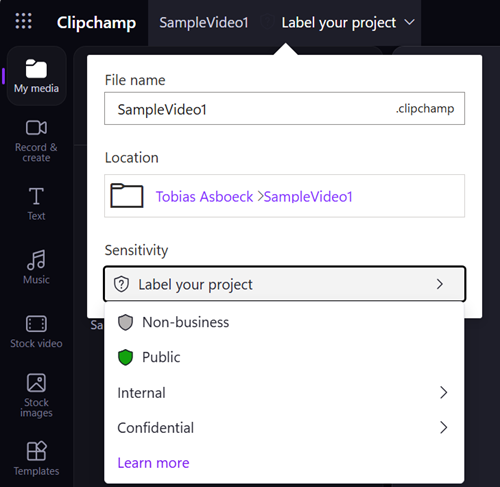
If the setting is $false and a .clipchamp project does not already have a sensitivity label:
The project will not receive a sensitivity label. The label picker will be empty in the Clipchamp editor, same as with MP4 files.
- The organization’s default sensitivity label policy is not applied to the project.
- Users cannot assign or update a sensitivity label on the project.
- The sensitivity label picker is not displayed in the Clipchamp editor.
- Exported MP4 videos do not inherit the project sensitivity label.
If the setting is $false and a .clipchamp project already has a sensitivity label:
This configuration will affect users and their existing Clipchamp projects.
- Unlabeled .clipchamp projects remain unlabeled and cannot be assigned a sensitivity label in the Clipchamp editor.
- Projects that already carry a label keep it and continue to enforce its policies, but users cannot update that label, and exported videos will not inherit it. The Clipchamp editor warns users that the exported video will not inherit the project label.
Below is a simulation of the current situation when the EnableSensitivityLabelForVideoFiles setting is set to False. Sensitivity labels are already available in .clipchamp project files. After the update, users will see the described behavior.