
Copilot declarative agents in Agent Builder are moving from a single-owner model to one supporting multiple owners.
Previously, only the person who created an agent could manage it, which meant that whether the person changed roles or left the organization, responsibility for the agent could become unclear.
Agent owners can now assign several people as owners of the same agent, sharing responsibility for keeping it up to date. All owners of an agent have the same permissions to edit, manage, and share it, so there is no distinction between a main owner and additional owners.
Alongside this owner update, Microsoft has also redesigned how declarative agents are shared.
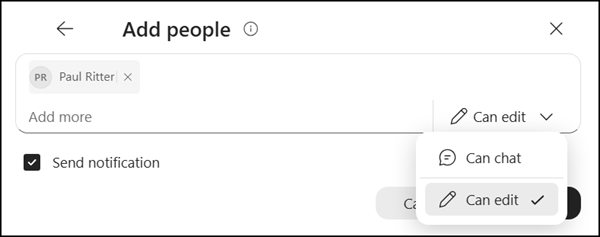
When granting access to a declarative agent, owners can now add owners and chat users, assign the right role to each person, copy a sharing link, and send an email notification letting someone know they have been given access.
Note:
Microsoft calls the role owner, but the permission itself is named Editor. There is no distinct “Owner” permission to set.
- Owners / Editors
Can manage, edit, use, and share the declarative agent. - Chat users
Can find the agent in the agent store and start using it.
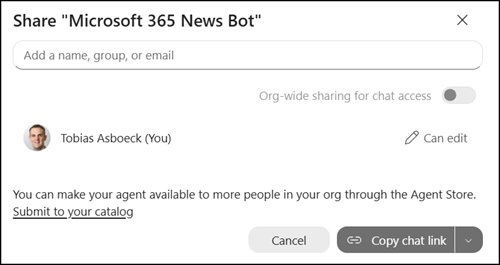
Open the declarative agent in Agent Builder and share it to find the new options.
The agent owner has Edit permissions. If you share the agent with someone with Edit permissions, that coworker also has “owner” permissions.
Owners can also share an agent with everyone in the company, unless an administrator restricts it. The agent is published to the agent store, where any user can find and start using it.
- Microsoft 365 groups and Entra ID security groups cannot be added as agent owners.
- Groups can still be given permission to chat with an agent. Owners must add individuals by name if they are meant to help manage or edit it.
