
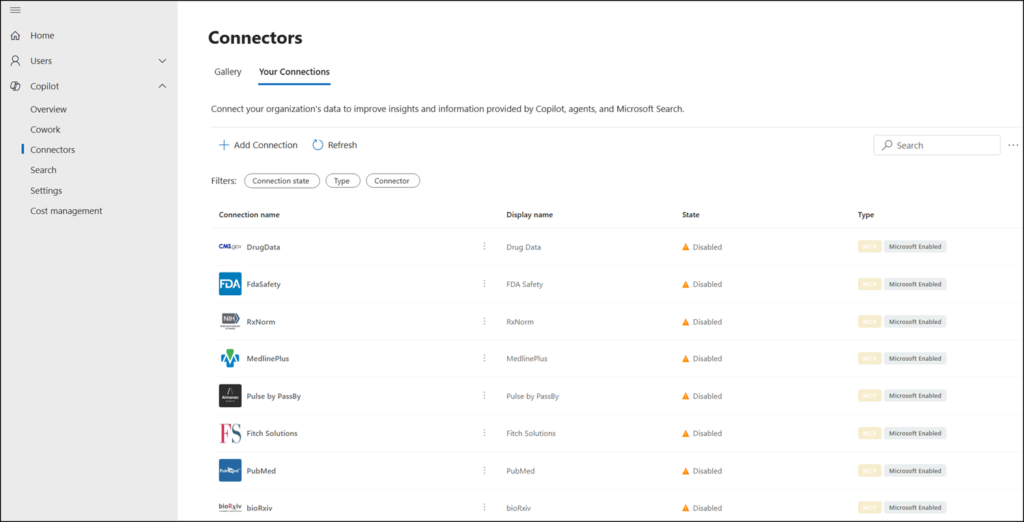
Microsoft will retire the PowerShell cmdlet Set-FederatedConnectorToggle in the Connector.cmd module. The Set-FederatedConnectorToggle cmdlet lets Search Administrators configure the default setting for Federated Copilot Connectors, which are enabled by default.
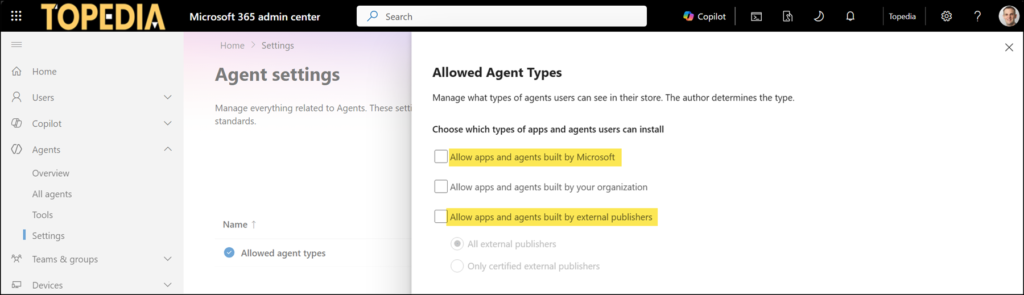
Instead of the cmdlet, federated connectors will use the default “Allowed agent types” configuration in Agent 365, unifying Copilot connector management into a single administration experience.
This retirement affects all Search Administrators who previously used the Set-FederatedConnectorToggle cmdlet and the Connector.cmd module. It does not alter which connectors are enabled or disabled. It changes which control surface governs that state going forward.
Timeline
- 25 August 2026, the Set-FederatedConnectorToggle cmdlet will be deprecated.
- From 5 October 2026, Federated Copilot Connectors will honor the “Allowed agent types” settings in all tenants.
How does this affect your organization?
Currently, federated connector availability is governed through the standalone Set-FederatedConnectorToggle CLI toggle, introduced in May 2026. All new federated connectors are enabled by default. A Search administrator can change the default configuration with the cmdlet Set-FederatedConnectorToggle.
From 5 October 2026, federated connector and agent access controls will both be governed from a single location through the Allowed agent types tenant setting in Agent 365. The separate CLI control will no longer apply. Search administrators can update the agent settings in the Microsoft 365 admin center > Agents > Settings > Allowed agent types.
Search administrators should update any scripts, automation, or administrative workflows that rely on the Set-FederatedConnectorToggle CLI toggle before 25 August 2026.
If administrators take no action, tenants will remain governed by their existing Allowed agent types configuration and default posture.
