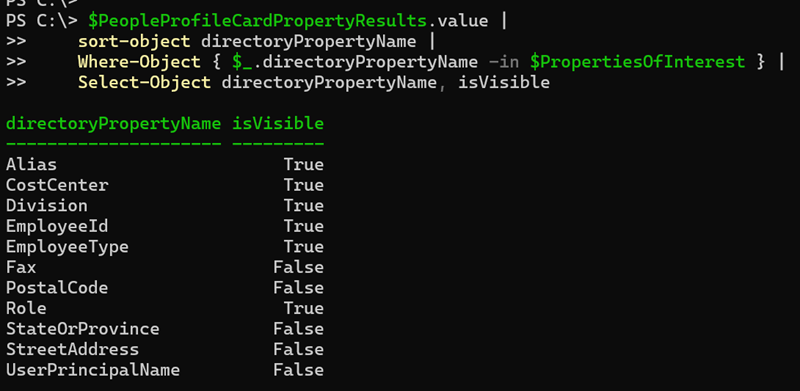
Microsoft is changing the default visibility of 11 existing profile card properties. These properties can be populated from Microsoft Entra ID and other supported external data sources such as People Graph Connectors and Microsoft 365 Organizational Data.
- Today, the properties are hidden by default and require an administrator to enable them manually (opt-in).
- Starting in September 2026, the properties will display by default whenever they contain data, unless an administrator updates them beforehand (opt-out).
This update affects organizations if one of the 11 profile properties contains data. Microsoft does not change the underlying attribute values or source systems. Existing profile card configurations are neither migrated nor altered by this change.
Content
Timeline
************
Updated 4 September 2026:
Microsoft has updated the timeline.
************
- Before 24 September 2026 (previously 24 August): People Administrators should manually update the configuration if the organization wants to keep the current configuration.
- Starting 24 September 2026: Microsoft will display the properties by default whenever they contain data if the configuration was not updated.
How does this affect your organization?
In September 2025, Microsoft introduced the option to extend the Microsoft 365 profile card with 11 additional properties.
The properties are:
- Division
- Role
- Employee number
- Employee type
- Cost center
- User principal name (UPN)
- Alias (mailnickname)
- Fax
- Street address
- State
- Postal code
Currently, administrators can enable each of these properties individually so they appear on profile cards. It’s effectively an opt-in for profile property visibility.
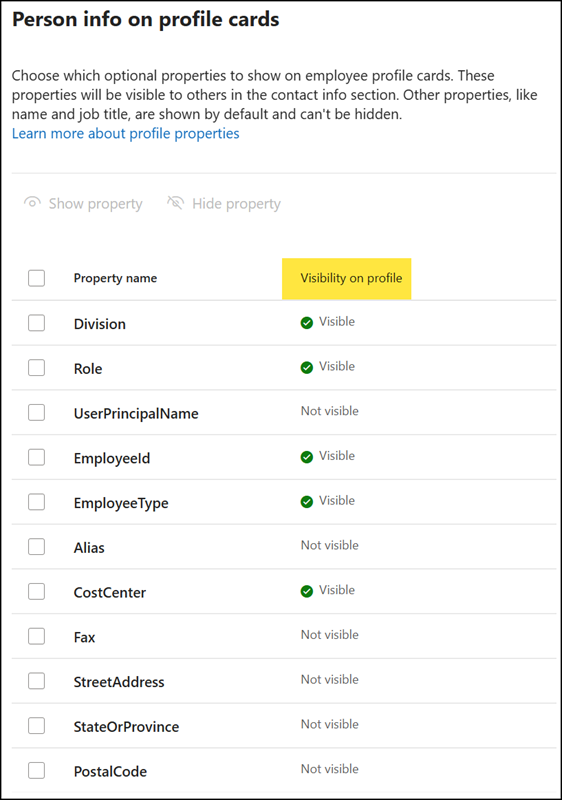
After the rollout, Microsoft will display the 11 properties automatically wherever the source attribute has a value. This applies regardless of whether the data originates from Microsoft Entra ID, Microsoft 365 Organizational Data, or Microsoft Entra People Graph Connectors.
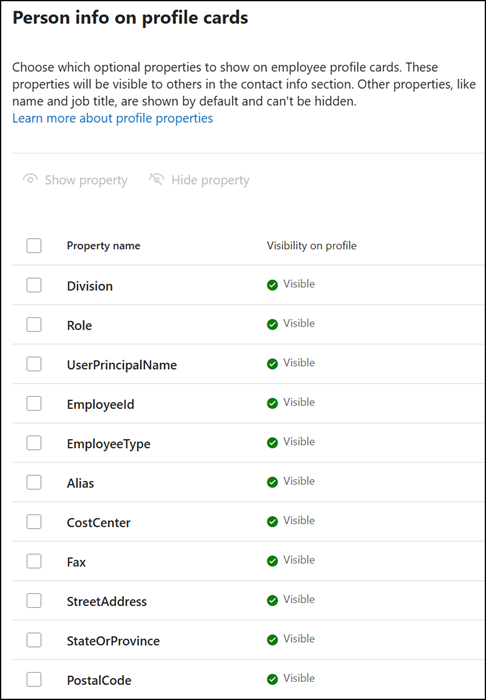
What should a People Administrator prepare?
If your organization does not want one or more of these properties displayed on profile cards, review and adjust visibility settings before 24 September 2026. Changes to property settings can take up to 24 hours to be reflected on profile cards across Microsoft 365 experiences.
An administrator must update the isVisible profile card property, either via the Microsoft 365 admin center or Microsoft Graph, for each property that should still be hidden starting 24 September 2026. You need the People Administrator or Global Administrator role, or the Microsoft Graph permission PeopleSettings.ReadWrite.All.
Microsoft provides a property mapping:
| Profile card label | directoryPropertyName |
|---|---|
| Division | Division |
| Role | Role |
| Employee number | EmployeeId |
| Employee type | EmployeeType |
| Cost center | CostCenter |
| User principal name (UPN) | UserPrincipalName |
| Alias (mailnickname) | Alias |
| Fax | Fax |
| Street address | StreetAddress |
| State | StateOrProvince |
| Postal code | PostalCode |
Good to know:
If you ever updated the properties manually, Microsoft will not change them.
Below is a PowerShell sample to check the current state of all 11 properties.
Import-module Microsoft.Graph.Authentication
Connect-MgGraph -Scopes "PeopleSettings.ReadWrite.All"

$PropertiesOfInterest = @(
    "Division",
    "Role",
    "EmployeeId",
    "EmployeeType",
    "CostCenter",
    "UserPrincipalName",
    "Alias",
    "Fax",
    "StreetAddress",
    "StateOrProvince",
    "PostalCode"
)

# Get all profile card properties
$Url = "https://graph.microsoft.com/v1.0/admin/people/profileCardProperties"
$PeopleProfileCardPropertyResults = Invoke-MgGraphRequest -Method GET -Uri $Url

# Filter the results to only include the 11 properties of interest and sort them by directoryPropertyName
$PeopleProfileCardPropertyResults.value |
    Where-Object { $_.directoryPropertyName -in $PropertiesOfInterest } |
    Sort-Object directoryPropertyName |
    Select-Object directoryPropertyName, isVisible
Check my PostalCode value: False
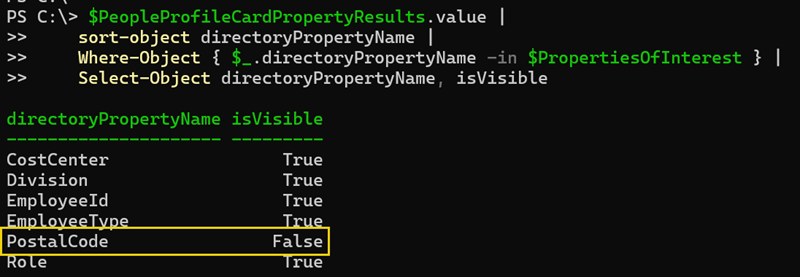
Microsoft will add isVisible:True to the people profile card if the property is not already there. The POST method creates the property. By default, the 11 properties are not present, so Microsoft can add them with a value of True.
From my sample:
I manually updated the PostalCode property via the Microsoft 365 admin center, so the system initially added the property with True. When I disabled the property a few seconds later, the system updated it to False.
Now, you have two methods that you can prepare before 24 September 2026.
- Update the 11 profile properties in the Microsoft 365 admin center.
For example, select all properties, show them, save, and update them again to hide them. With my previous PowerShell sample, you can now see all 11 properties have been added with the value False.
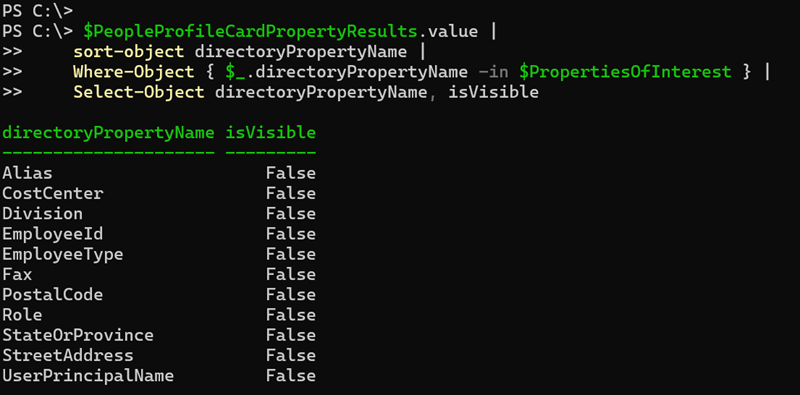
- Create the required properties via Microsoft Graph with a POST request. If the property already exists, the sample will return an error (because you cannot add the property again).
Run this for each property. You cannot add multiple properties in one request.
# Create a new profile card property with the directoryPropertyName "Alias" and set isVisible to false

$Body = @"
{
  "directoryPropertyName": "Alias",
  "isVisible": false
}
"@

$Url = "https://graph.microsoft.com/v1.0/admin/people/profileCardProperties"
$Result = Invoke-MgGraphRequest -Method POST -Uri $Url -Body $Body -ContentType "application/json"
$Result - Optional: To update an existing property, send a PATCH request.
# Update the profile card property with the directoryPropertyName "Alias" and set isVisible to true

$Body = @"
{
  "directoryPropertyName": "Alias",
  "isVisible": true
}
"@

$Url = "https://graph.microsoft.com/v1.0/admin/people/profileCardProperties"
$Result = Invoke-MgGraphRequest -Method PATCH -Uri $Url -Body $Body -ContentType "application/json"
$Result
Congratulations, now it’s pretty flexible, and Microsoft will not add or update them in September 2026.