
OneDrive and SharePoint are getting a new option to save new shortcuts to a dedicated Shortcuts folder instead of the OneDrive root. This update applies to OneDrive and SharePoint document libraries and does not affect shortcuts already added.
The new dedicated Shortcuts option is optional. Users can continue saving shortcuts to My files or other locations if they prefer.
Timeline
The rollout should be completed in July 2026.
How does this affect your users?
When a user adds a shortcut in OneDrive or SharePoint, they can now choose to save it to a new dedicated Shortcuts folder.
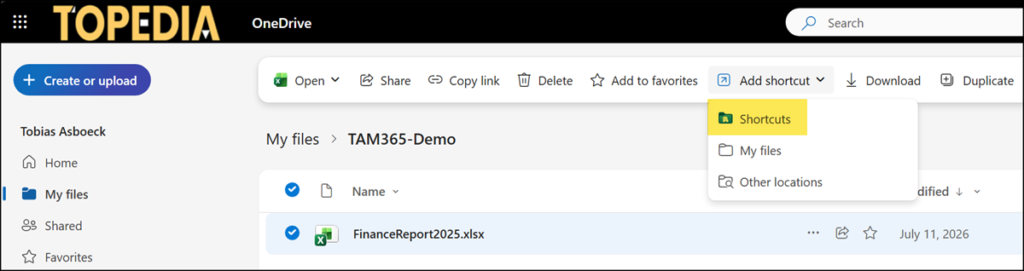
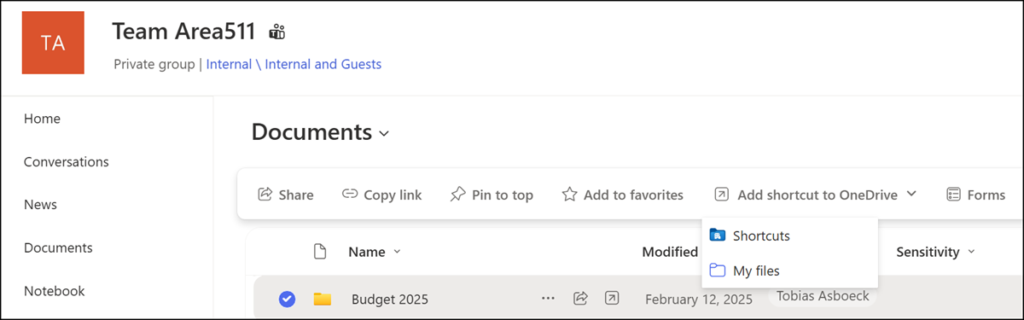
Users now have three options for shortcuts in OneDrive and SharePoint.
- NEW: Shortcuts
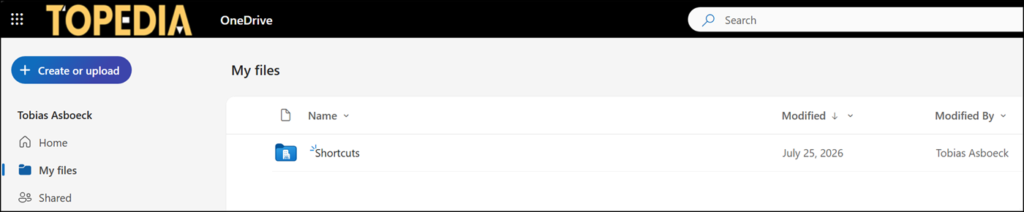
Supported for files and folders. A Shortcuts folder is automatically created in the OneDrive root the first time a user selects it as a save destination. If a user already has a folder named Shortcuts in the OneDrive root, the existing folder is reused instead of creating a new one. The folder is visually distinct, using a unique blue color and a building icon so it stands out from regular folders. A confirmation message displays after saving, showing where the shortcut was placed.
Users can move the new Shortcuts folder to a subfolder. The system will still use the existing Shortcuts folder rather than creating a new one in the OneDrive root.
- My files
Supported for files and folders. The shortcut lands in the OneDrive root, alongside the user’s own files and folders. - Other locations
Supported for files only. A free choice of where to store the shortcut.
