
Microsoft is retiring Restricted SharePoint Search (RSS) in SharePoint Online. Restricted SharePoint Search was introduced in March 2024 and is a tenant-wide control that limits which sites appear in Microsoft Search and Microsoft 365 Copilot.
Organizations should transition to Restricted Content Discovery (RCD) before RSS stops working, generally available since May 2025.
- An organization could use Restricted SharePoint Search if it has at least one Microsoft 365 Copilot license; otherwise, PowerShell will indicate a license is missing. It is not part of the SharePoint Advanced Management add-on.
- This retirement only affects organizations if Restricted SharePoint Search is enabled in the SharePoint tenant. It is easy to check with SharePoint PowerShell and Get-SPOTenantRestrictedSearchMode.

This retirement does not remove content or change permissions. It affects Microsoft Search and Copilot discoverability only.
Timeline
- New RSS enablement will be blocked from 31 July 2026.
- Existing configurations will continue to work until RSS is fully retired on 31 January 2027.
- RSS PowerShell cmdlets stop working on 28 February 2027.
How does this affect your organization?
Restricted SharePoint Search (RSS) is a tenant-wide switch that prevents SharePoint content from appearing in organization-wide search and Copilot unless the site is on an administrator-curated allowed list. Organizations should now use Restricted Content Discovery (RCD).
Existing RSS configurations will not be automatically migrated to the newer RCD. Administrators who take no action risk having previously restricted content become discoverable once RSS stops enforcing these restrictions.
The difference between RSS and the newer RCD:
- Restricted SharePoint Search (RSS) > will be retired
An allow-list model. RSS is off by default at the tenant level. Once an administrator enables it, only sites added to the curated allowed list appear in organization-wide search and Copilot; all other sites, including newly created ones, are excluded until added. Users can interact with files and content they own or have previously accessed. RSS is managed only through PowerShell. - Restricted Content Discovery (RCD)
A block-list model. Administrators mark specific sites for exclusion from organization-wide search and Copilot; all other sites remain discoverable by default, including newly created ones. RCD is managed through the SharePoint admin center or PowerShell. RCD requires at least one Microsoft 365 Copilot license in your tenant.
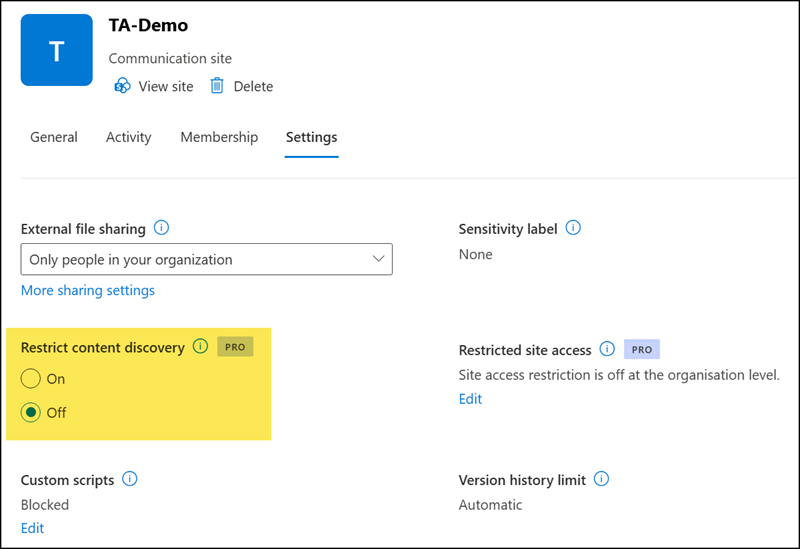
It’s the site property RestrictContentOrgWideSearch with SharePoint PowerShell.
Set-SPOSite -Identity <SiteUrl> -RestrictContentOrgWideSearch <$true | $false>What should you do if Restricted SharePoint Search is in use?
- Identify sites on the RSS allowed list with Get-SPOTenantRestrictedSearchAllowedList.

- Enable RCD for specific sites if Microsoft Search and Copilot should not use the content.
Restrict this site’s content from appearing in Microsoft 365 Copilot, AI agents, and organization-wide search results. When this setting is on, content will only be discoverable through the site-level search by users who have access to the site.
Restricted Content Discovery
Microsoft recommends completing the transition to RCD or another governance control, then disabling RSS in a controlled way, rather than waiting until RSS is retired at the end of January 2027. Content previously excluded from search can become discoverable once RSS stops enforcing these restrictions, so an unplanned transition risks exposing content deliberately withheld during a permissions review.
