
Microsoft is rolling out Edge Enterprise Preview to general availability, a new way to flight prerelease builds to users directly inside the Stable application instead of through a separate Edge Beta or Dev install.
- This GA rollout applies only to devices where Microsoft Edge update policies already target the Beta or Dev channel via the TargetChannel policy.
- The rollout does not affect devices running the Stable channel by default.
Timeline
The rollout to general availability should be completed by mid-June 2026.
How does this affect organizations?
In February, I already tested the public preview of Edge Enterprise Preview.
Edge Enterprise Preview adds a direct option in the Edge About section to activate the Preview channel. When enabled, Edge automatically downloads the latest prerelease build and prompts the user to restart the browser.
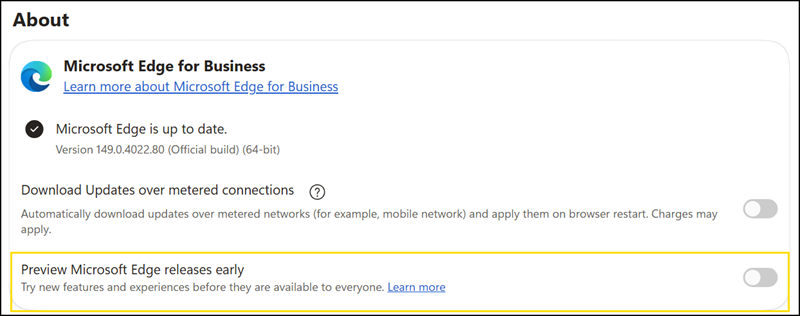
Previously, a device targeted to a prerelease channel ran that build as its primary browser, and users had no built-in way to return to Stable without the administrator changing the policy.
This rollout only affects users whose devices are targeted to the Edge Beta or Dev channel through the TargetChannel policy.
With the GA rollout, prerelease builds are delivered within the Stable application itself, and a built-in rollback lets users switch between the prerelease and Stable channels without reinstalling Microsoft Edge. Microsoft will update the default setting of EdgePreviewEnrollmentType for users whose TargetChannel is set to Beta or Dev.
EdgePreviewEnrollmentType
This policy is only effective if the TargetChannel policy is set to Beta or Dev.
- If you set this policy to Allow Opt-out or don’t configure it
The channel in the Edge Stable application will be determined by TargetChannel. End users will be able to exit the Edge Preview experience, to return to the Stable channel, at any time.- If you set this policy to Required
The channel within the Edge Stable application is determined by TargetChannel. End users won’t be able to leave the Edge Preview experience.
If organizations want to use the previous behavior, they must now explicitly set the EdgePreviewEnrollmentType policy to Required.
