
Microsoft Forms now supports Purview Sensitivity Labels

Users can now classify forms created via Microsoft Forms. The enhancement is currently in rollout, but the documentation is not yet available or published/updated.

Based on testing with my personal configuration, Forms supports labels with the Files scope, including encryption, but not user-defined permissions (only assigned permissions). If the feature is available in your tenant, the usual Sensitivity symbol appears in the Forms designer (in the top center), next to where the system saves the form.
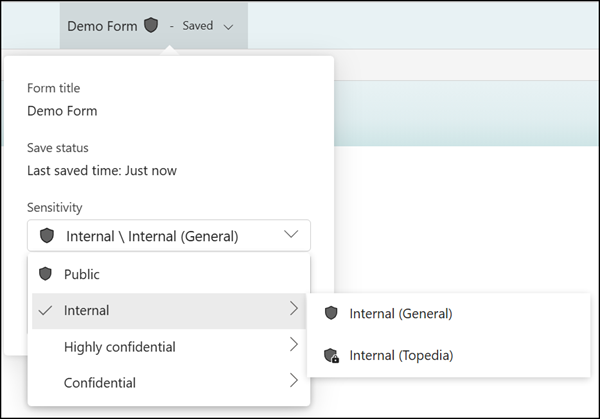
Purview Sensitivity Labels in Microsoft Forms

Restricted forms display a banner for authors and co-authors, and collection settings are restricted accordingly.
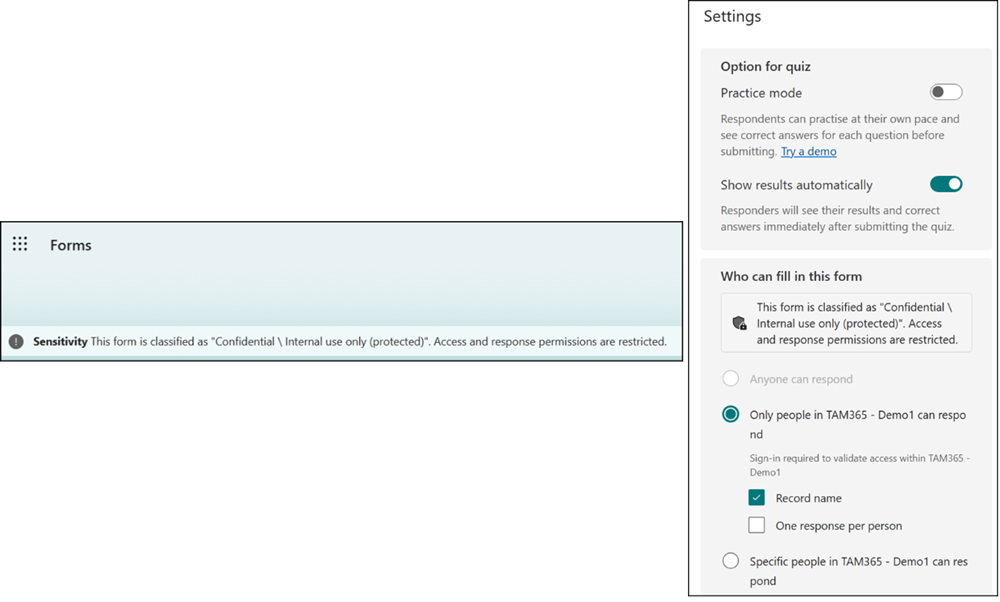
Restricted forms
Restricted forms

Users also see the sensitivity label on the form.

Sensitivity label on the form

Authors and co-authors can manually assign or edit sensitivity labels on forms, ensuring that only users with appropriate permissions can access the form design and response pages. Sensitivity labels are also inherited by Excel files generated from Forms, maintaining consistent data protection across exported content.
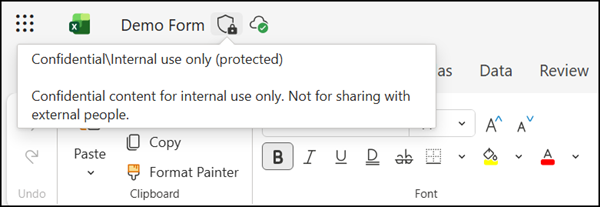

Sensitivity labels will also be inherited by Excel files
Share
Avatar photo

Tobias Asböck

Tobias is a Senior System Engineer with more than 10 years of professional experience with Microsoft 365 products such as SharePoint Online, SharePoint Premium, OneDrive for Business, Teams Collaboration, Entra ID, Information Protection, Universal Print, and Microsoft 365 Licensing. He also has 15+ years of experience planning, administering, and operating SharePoint Server environments. Tobias is a PowerShell Scripter with certifications for Microsoft 365 products. In his spare time, Tobias is busy with updates in the Microsoft 365 world or on the road with his road bike and other sports activities. If you have additional questions, please contact me via LinkedIn or [email protected].

Leave a Reply

Your email address will not be published. Required fields are marked *