
Microsoft is introducing support for sensitivity labels on video files stored in SharePoint and OneDrive or edited via Microsoft Clipchamp. The feature is currently in public preview, supports MP4 files, and is disabled by default. Global availability has not yet been announced.
Sensitivity labels are already familiar to many users as the classification tags applied to documents and emails to indicate how information should be handled. This update extends the concept to video files, so recordings of meetings, training sessions, product demonstrations, and internal communications can be classified in the same way as other content.
In practice, users will not notice a change in how they watch or share videos. Labels are applied as metadata attached to the file rather than as a restriction on access or playback. All labeled MP4 files are supported for playback in SharePoint, OneDrive, Teams, and Clipchamp.
The intention is to bring video content into the same governance framework as documents, giving organizations a consistent way to classify and track sensitive content across different file types.
If sensitivity labels are already in use for SharePoint files, a new Sensitivity section is available on MP4 files. The section is empty if the preview is not enabled. It’s not a bug.
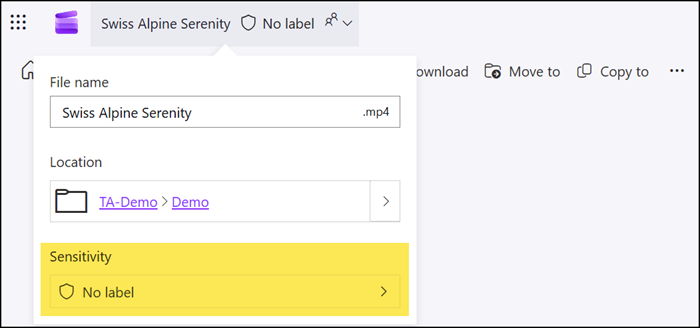
A SharePoint administrator should review the tenant setting EnableSensitivityLabelForVideoFiles.

EnableSensitivityLabelforVideoFiles
Allows tenant admins to turn on support for Video files with sensitivity labels for the following scenarios:
- Applying a sensitivity label to Video files on SharePoint.
- Uploading a labeled document, and then extracting and displaying that sensitivity label.
The valid values are:
- True – Enables support for Video files.
- False (default) – Disables support for Video files.
Set-SPOTenant -EnableSensitivityLabelForVideoFiles $true
After the setting is changed, users can select the sensitivity labels available for files stored in SharePoint and OneDrive.
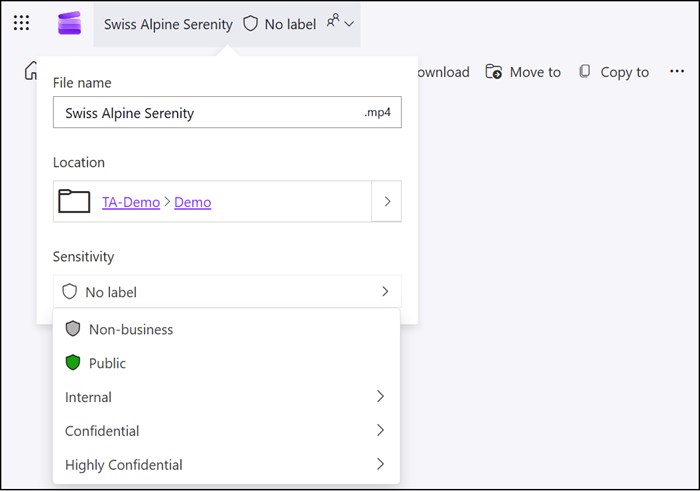
You should review the current, known restrictions before enabling the feature:
- MP4 files support manually applying sensitivity labels, but can’t be labeled automatically or by default.
- MP4 files can automatically inherit a sensitivity label from a Teams meeting (currently in rollout).
- For Microsoft 365 Multi-Geo, you must connect to each of your geo-locations and run the command separately.
- When MP4 files have a sensitivity label that applies encryption, they can’t be downloaded.
- Sensitivity labels that apply encryption must be configured with the Assign permissions now option, rather than user-defined permissions.
The download button is not available for MP4 files with a sensitivity label that applies encryption.

