
Microsoft has added a new image model to PowerPoint for users with a Microsoft 365 Copilot license.
The new model, Flux.2 Flex from Black Forest Labs is now available alongside the existing options in the image model picker within the Copilot pane. It is designed to produce higher-quality visuals with improved text and layout handling, making it well-suited for generating images that fit naturally into presentations.
FLUX.2 [flex] delivers fine-grained control for precise results. It is purpose-built for typography and text-forward workflows, maintaining small details in complex scenes while enabling rapid iteration at scale. Teams use it for production-grade brand design, product UI prototyping, and any workflow where accurate text rendering is critical.
This positioning makes FLUX.2 [flex] ideal for platform builders and creative teams who need to balance speed, scale, and cost while maintaining creative control.
- The model is not selected by default. Users who want to try it need to open the Copilot pane in PowerPoint, select the model picker at the top of the pane, scroll down to the image models section, and choose Flux.2 Flex from the list.
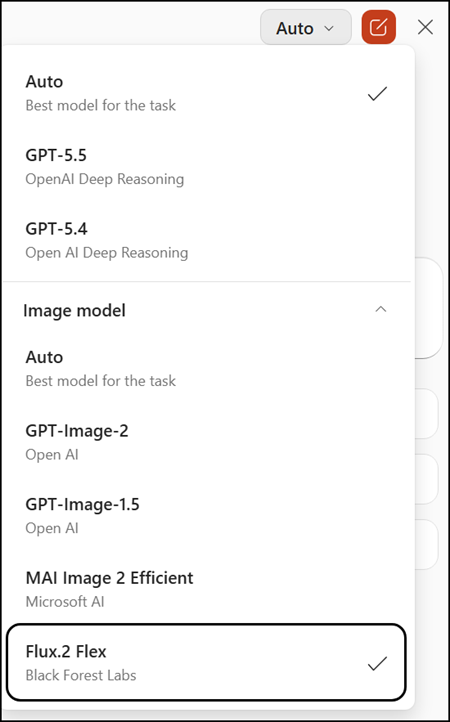
- Flux.2 Flex is a third-party model hosted within Microsoft-controlled Azure infrastructure.
Customer data is processed in accordance with Microsoft’s existing enterprise data protection commitments. It is not shared with or processed outside of Microsoft’s controlled environment.
Flux.2 Flex is available to users with a Microsoft 365 Copilot license and requires image generation to be enabled in the organization. The rollout should be completed.
