
Microsoft is updating how access to quarantined email content is managed in Microsoft Defender for Office 365. A new permission is being introduced that gives organizations more precise control over who can view and download the content of quarantined messages.
- This update is part of the Defender XDR Unified Role-Based Access Control (RBAC). It has no effect on configurations using legacy role-based access control.
- Defender XDR RBAC usually requires a Defender for Office 365 Plan 2 license.
Timeline
The rollout should be completed in May 2026.
How does this affect your organization?
Following the recent permission update in Defender XDR RBAC to scope access to user-reported malware and phishing emails, Microsoft is rolling out an additional permission to grant read access to all quarantined emails.
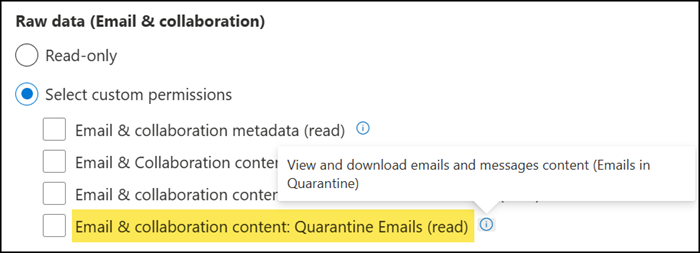
Administrators who currently hold permissions such as Email and collaboration quarantine (manage) or Security data basics (read) will automatically receive the new permission, so their access to quarantined message content continues without interruption. IT Security members without the new permission will still be able to see message metadata, but will no longer be able to preview or download the actual content of quarantined emails.
To summarize the four permissions:
- Email & collaboration metadata (Read)
Users with this permission can investigate email threats using hunting tools and dashboards, but cannot open or download any message content. - Email & collaboration content (Read)
Users with this permission can open and download any email content and attachments across all Defender workflows and scenarios. - NEW: Email & collaboration content: Emails associated with alerts (Read)
Users with this permission can open and download email content only when the message has triggered a user-reported alert for malware or phishing. - NEW: Email & collaboration content: Quarantine Emails (Read)
Users with this permission can open and download quarantined messages, but have no access to email content outside of quarantine.
This update has no impact on how threats are detected, how email verdicts are assigned, or how mail flows through the organization. It also does not change the end-user quarantine experience.
