
Microsoft is expanding the scope of Data Loss Prevention (DLP) policies for Microsoft 365 Copilot in Word, Excel, and PowerPoint. Currently, DLP policies only block Copilot from processing sensitivity-labeled files stored in SharePoint or OneDrive for Business.
Timeline
The rollout should be completed in May 2026.
Updated 10 June 2026:
The rollout should be completed in June 2026.
How does this affect your organization?
Currently, if a DLP policy in Microsoft Purview is configured with the action “Restrict Copilot from processing content” for sensitivity-labeled files, that action only blocks Copilot from processing files stored in SharePoint or OneDrive for Business. Local device storage and other locations accessible through Office applications are not restricted.
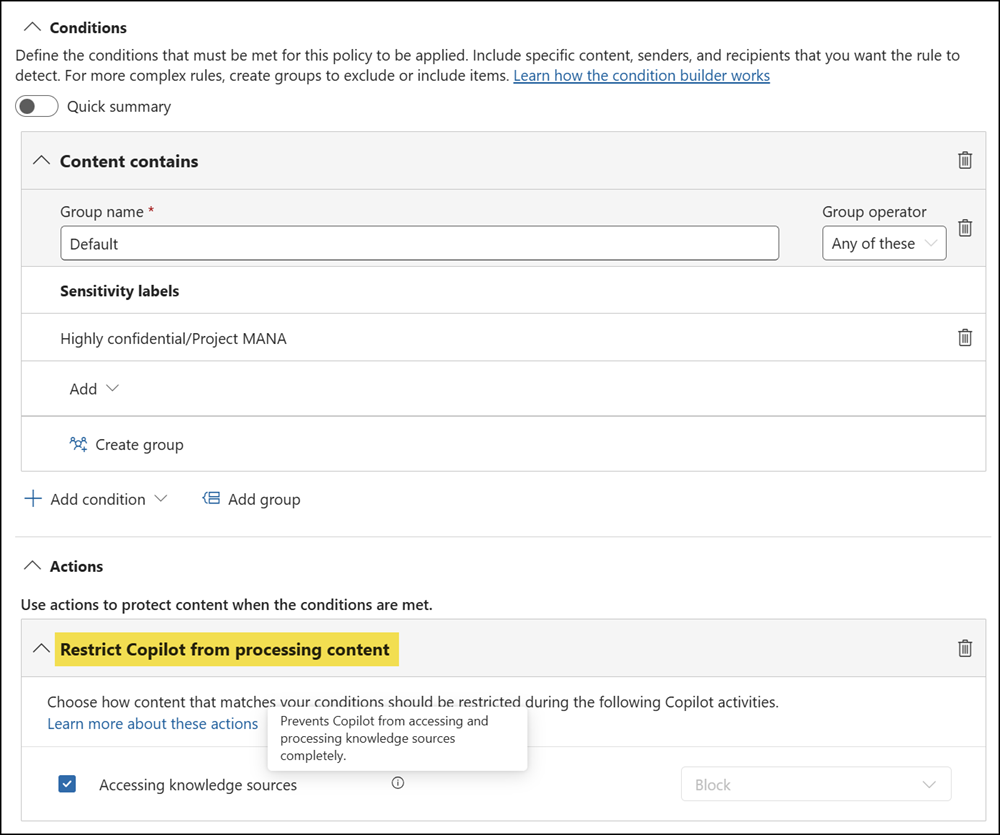
After this update, these DLP policies will apply to Word, Excel, and PowerPoint files regardless of storage location, including SharePoint, OneDrive for Business, local device storage, and other locations accessible through Office applications.
The impact for users:
When a file carries a sensitivity label that an organization’s policy restricts Copilot from processing (as in the screenshot above), Copilot will not engage with the file’s content in Word, Excel, or PowerPoint. This behavior should then be consistent across all supported storage locations.
That said, a restriction comes with limitations, as Microsoft lists in the documentation:
When a file is open in Word, Excel, or PowerPoint and has a sensitivity label for which DLP policy is configured to prevent processing by Microsoft 365 Copilot and Copilot Chat, the skills in these apps are disabled. Certain experiences that don’t reference file content or that aren’t using any large language models aren’t currently blocked on the user experience.
This enhancement will be available to organizations using Microsoft 365 Copilot alongside Purview Data Loss Prevention and Purview Information Protection.
