
Microsoft is rolling out expiration policies for internal “People in your organization” sharing links in SharePoint and OneDrive. This enhancement allows administrators to automatically expire internal sharing links after a defined period, improving data governance and reducing exposure to stale access.
Previously, administrators could force an expiration policy for anonymous (“Anyone”) links.
Timeline
The rollout should be completed by late June 2026.
How does this affect your organization?
SharePoint administrators can now configure “People in your organization” sharing links to expire after a specific period, with a minimum of 7 days.
- By default, nothing changes. Internal “People in your organization” links do not expire unless an admin sets a policy.
- A SharePoint admin can set the expiration policy for a single SharePoint or OneDrive site collection, or for all SharePoint or OneDrive site collections in the tenant as a global setting.
- This update has no impact on existing sharing links. Only links created after a policy is applied will automatically expire per the configured timeframe.
SharePoint Online PowerShell required
All settings are currently available via SharePoint Online PowerShell, not in the SharePoint admin center.
Tenant-level configuration
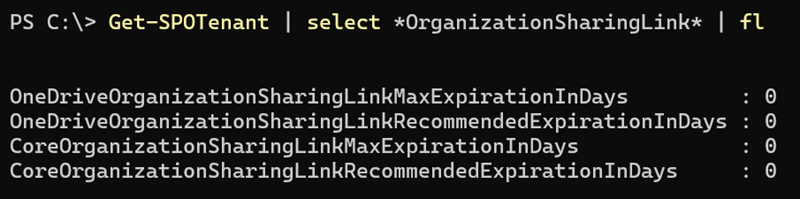
All SharePoint and OneDrive sites inherit the tenant-level link expiration policy. The settings are available separately for SharePoint and OneDrive and are configured through four new properties.
- CoreOrganizationSharingLinkMaxExpirationInDays
CoreOrganizationSharingLinkMaxExpirationInDays sets the maximum number of days before organization sharing links expire across all SharePoint sites, excluding OneDrive. This is a tenant-wide setting, and all geos inherit the policy.
The value can be between 7 and 720 days. To remove the expiration requirement, set the value to zero (0).
- CoreOrganizationSharingLinkRecommendedExpirationInDays
CoreOrganizationSharingLinkRecommendedExpirationInDays sets the recommended number of days before organization sharing links expire across all SharePoint sites, excluding OneDrive. This setting provides a suggested expiration period to users when they create sharing links. This is a tenant-wide setting, and all geos inherit the policy.
The value can be between 7 and 720 days and must be less than or equal to the maximum expiration value set by CoreOrganizationSharingLinkMaxExpirationInDays. When set to 0, the default value will be CoreOrganizationSharingLinkMaxExpirationInDays.
- OneDriveOrganizationSharingLinkMaxExpirationInDays
OneDriveOrganizationSharingLinkMaxExpirationInDays sets the maximum number of days before organization sharing links expire across all OneDrive sites. This is a tenant-wide setting, and all geos inherit the policy. The value can be between 7 and 720 days.
- OneDriveOrganizationSharingLinkRecommendedExpirationInDays
OneDriveOrganizationSharingLinkRecommendedExpirationInDays sets the recommended number of days before organization sharing links expire across all OneDrive sites. This setting provides a suggested expiration period for users when creating sharing links. This is a tenant-wide setting, and all geos inherit the policy.
The value must be between 7 and 720 days and must be less than or equal to OneDriveOrganizationSharingLinkMaxExpirationInDays. When set to 0, the default value will be OneDriveOrganizationSharingLinkMaxExpirationInDays.
Site collection overrides
SharePoint admins can also define expiration settings at the site level, overriding the tenant-level policy for specific SharePoint or OneDrive sites. Site collection admins and site owners cannot change these admin-controlled settings.
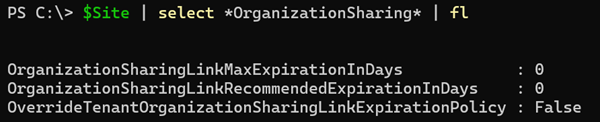
SharePoint admins can configure three new site properties.
- OrganizationSharingLinkMaxExpirationInDays
OrganizationSharingLinkMaxExpirationInDays sets the maximum number of days before organization sharing links on this site expire.
The value can be between 7 and 720 days. To remove the expiration requirement, set the value to zero (0).
- OrganizationSharingLinkRecommendedExpirationInDays
OrganizationSharingLinkRecommendedExpirationInDays sets the recommended number of days before organization sharing links on this site expire. This setting provides a suggested expiration period to users when they create sharing links.
The value can be between 7 and 720 days and must be less than or equal to the maximum expiration value set by OrganizationSharingLinkMaxExpirationInDays. When set to 0, the default value will be OrganizationSharingLinkMaxExpirationInDays.
- OverrideTenantOrganizationSharingLinkExpirationPolicy
OverrideTenantOrganizationSharingLinkExpirationPolicy controls whether the tenant-level organization sharing link expiration policy is overridden for this site. Overrides both the maximum and recommended values.
Possible values:
- False: Respect the tenant-level organization sharing link expiration policy.
- True: Override the tenant-level organization sharing link expiration policy (can be more or less restrictive).
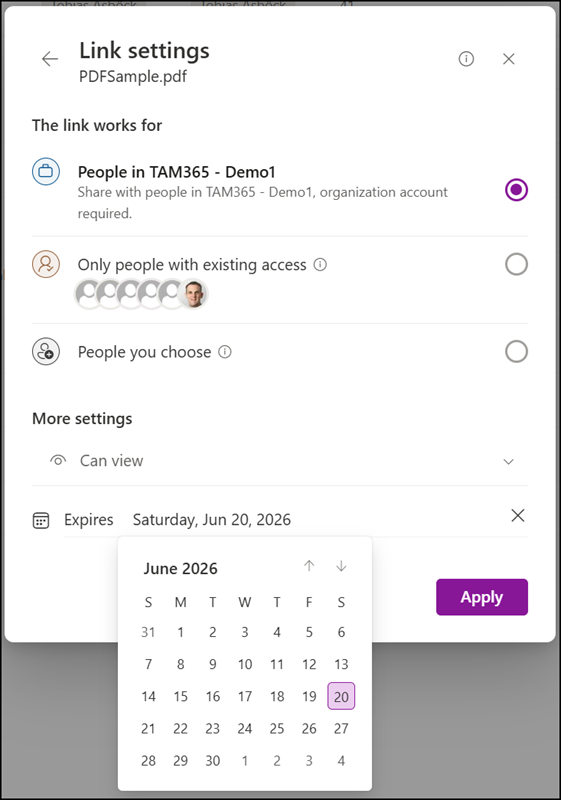
In my first sample, I configure an override for a SharePoint site with a recommended expiration of 90 days.
Set-SPOSite -Identity $Site -OverrideTenantOrganizationSharingLinkExpirationPolicy $true -OrganizationSharingLinkRecommendedExpirationInDays 90
When users share a document with the organization, SharePoint pre-fills the recommended date, but users can remove or extend it.
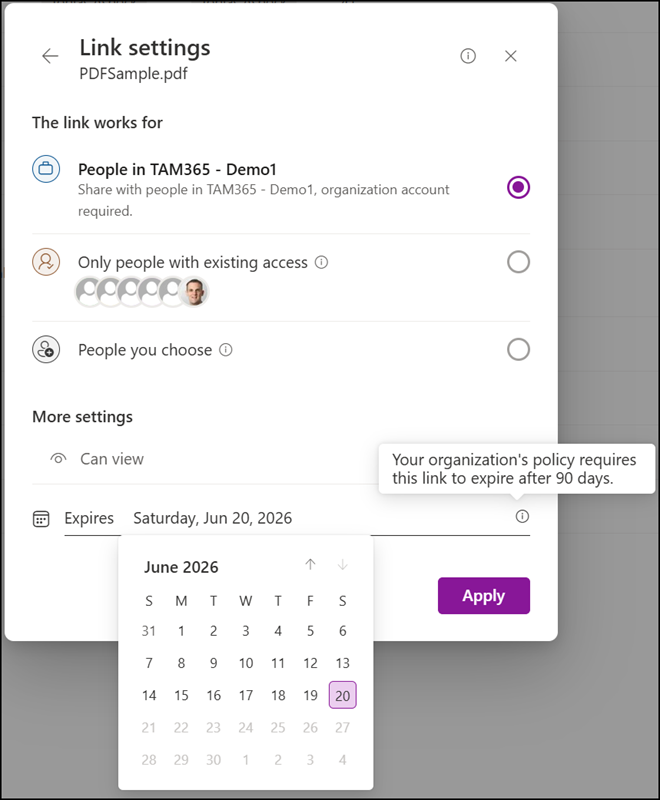
In my second sample, I configure the maximum expiration value to 90 days.
Set-SPOSite -Identity $Site -OverrideTenantOrganizationSharingLinkExpirationPolicy $true -OrganizationSharingLinkMaxExpirationInDays 90
When users share a document with the organization, SharePoint sets the latest allowed date, and users cannot remove it, but can choose a shorter period.
In my third sample, I combine both settings, with a maximum expiration of 180 days and a recommended expiration of 90 days.
Set-SPOSite -Identity $Site -OverrideTenantOrganizationSharingLinkExpirationPolicy $true -OrganizationSharingLinkMaxExpirationInDays 180 -OrganizationSharingLinkRecommendedExpirationInDays 90
When users share a document with the organization, SharePoint pre-fills 90 days as the expiration date. Users cannot remove it, but can extend it up to 180 days.
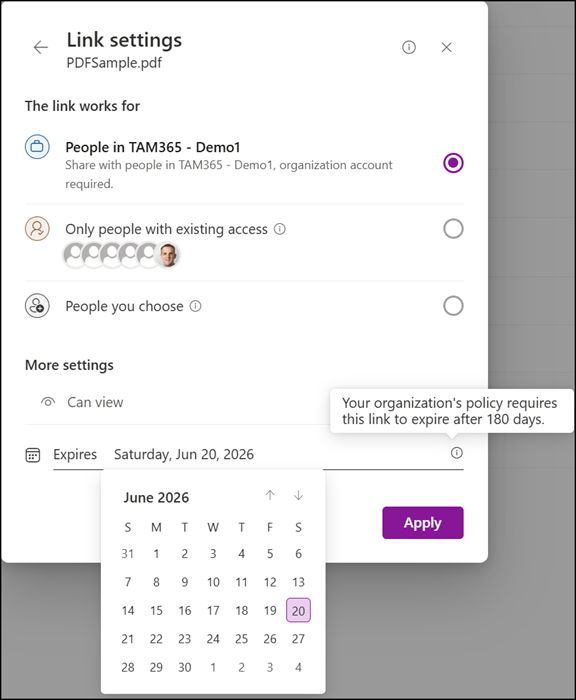

It does affect existing links. After you set a policy for your tenant if a user clicks on an existing link the policy is applied to the link.