
Microsoft is retiring the Semi-Annual Enterprise Channel option from the Office Deployment Service in the Microsoft 365 apps admin center and the setting for unmanaged devices in the Microsoft 365 admin center.
This retirement affects two services:
- The Office Deployment Service and Office Customization Service in the Microsoft 365 Apps Admin Center (for managed devices).
- The Microsoft 365 installation options in the Microsoft 365 Admin Center (for unmanaged devices).
The retirement is intended to drive adoption of the Monthly Enterprise Channel and Current Channel for Microsoft 365 Apps.
Timeline
Retirement starts on 6 April 2026.
Updated 12 April 2026:
The retirement starts on 15 April 2026.
How does this affect your organization?
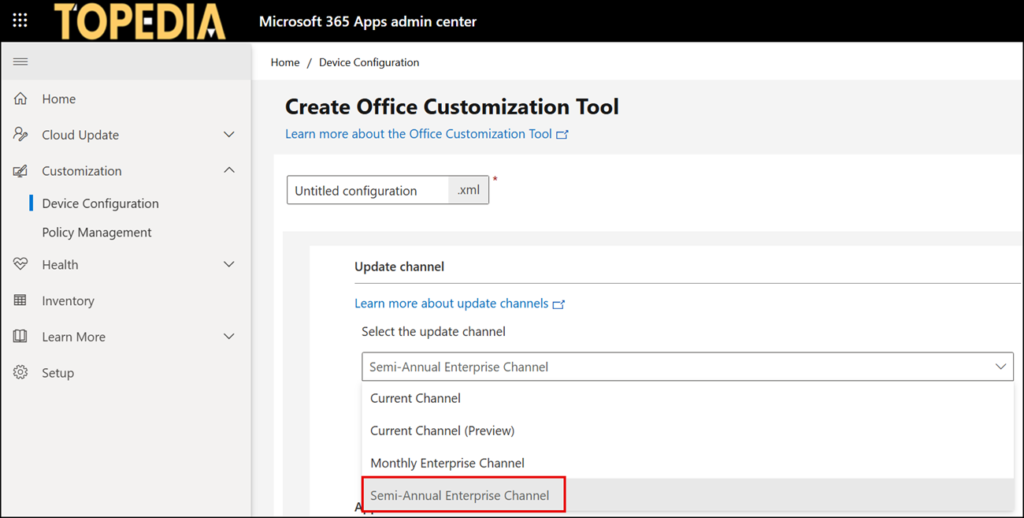
Your organization is affected if you use the Office Deployment Service (ODS) for Microsoft 365 Apps deployments on managed devices with the Semi-Annual Enterprise Channel configured,…
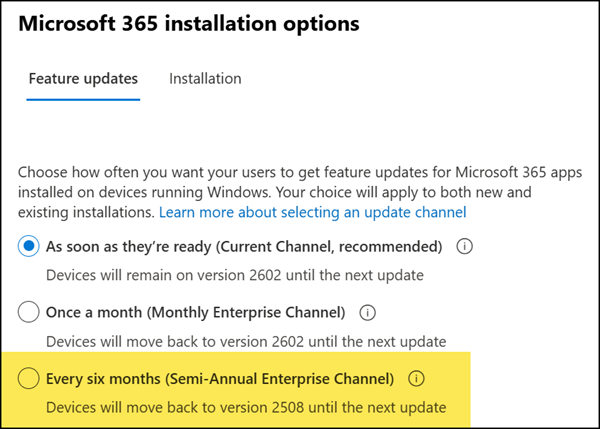
…or if you manage the release channel for unmanaged devices through the installation options in the Microsoft 365 admin center. This setting in the M365 admin center has no impact on devices managed through Intune, Configuration Manager, or Cloud Update.
Starting 6 April 2026, Microsoft will remove the Semi-Annual Enterprise Channel as a selectable update channel for new deployment configurations for managed devices, leaving only the Current Channel and Monthly Enterprise Channel available.
For unmanaged devices, the Semi-Annual Enterprise Channel in the Microsoft 365 admin center will be disabled and cannot be re-enabled.
Existing configurations that reference the Semi-Annual Enterprise Channel will retain the value when viewed or edited, and devices currently configured for the Semi-Annual Enterprise Channel are not affected. If you delete or modify an existing configuration, you will not be able to switch back to the Semi-Annual Enterprise Channel option.
Microsoft recommends switching to the Monthly Enterprise Channel.
- Monthly Enterprise Channel
Predictable monthly cadence with security and quality updates, designed for enterprise readiness while keeping devices current with minimal disruption. - Current Channel
Fastest access to new features alongside security updates, suited for users who need the latest capabilities. - Current Channel (Preview)
Early access to new features before they roll out to Current Channel, making it a good fit for pilot users and early adopters who want to evaluate what’s coming.
