
Microsoft is extending Microsoft 365 Copilot sharing capabilities to the OneDrive Sync Client on Windows. Users can now generate AI-based summaries of files and include them directly when sharing via the File Explorer share dialog or the OneDrive Activity Center. A Microsoft 365 Copilot license is required.
Timeline
The rollout should be completed in February 2026, depending on your OneDrive Sync Client release mode.
What is changing for Copilot-licensed users?
When users with a Microsoft 365 Copilot license share a file in Office on the web, Copilot can generate a sharing summary to include in the sharing message. For example, when I share my sample document about apples (AI-generated).
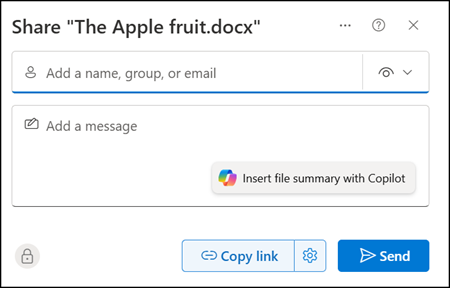
Copilot reads the file and creates a short AI-based summary for the recipients.
The summary is always a brief excerpt and can be manually extended. I tested this with some Word, Excel, and PowerPoint files. The longer the Word document or the more complex the Excel file, the more useful the generated summary.
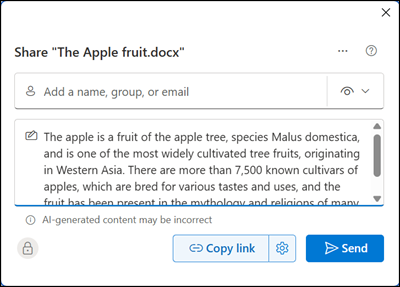
This feature is now also available on Windows via the OneDrive Sync Client. Users can share files either from the OneDrive Activity Center or directly from File Explorer.
Select OneDrive > Share from the file context menu or just Share in the OneDrive Activity Center.
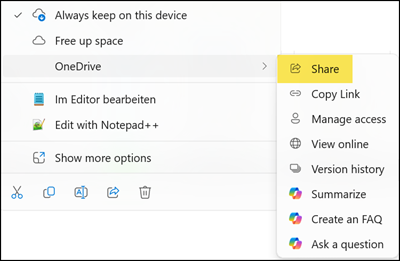
The sharing dialog should display a Copilot icon letting users generate a sharing summary for recipients.
In my case, Copilot worked as expected when sharing from Word on the web. However, when attempting the same action from my local Windows client, Copilot consistently returned an error. The full rollout may still be in progress.
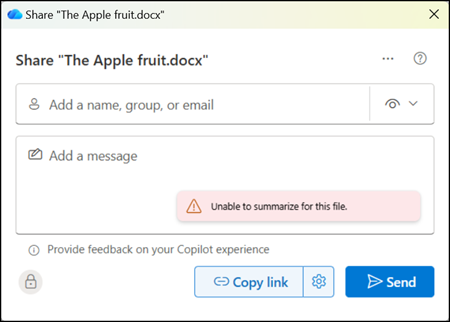
Copilot can still generate a sharing summary when the file is opened in the Word desktop app. The feature is enabled by default for users with a Microsoft 365 Copilot license.
Microsoft does not specify which file types are supported. Based on a quick check, any file type that Copilot can summarize also includes the summary option in the sharing dialog.
With Copilot in OneDrive, you can generate summaries for files stored on OneDrive without the need to open them individually. Whether it’s Excel spreadsheets, PowerPoint presentations, PDFs, or Word documents…
