
eSignature for Microsoft 365 now lets users draw their signature

Microsoft is rolling out a new option to draw an electronic signature when signing PDFs in eSignature for Microsoft 365, expanding beyond the existing typed signature experience.

Timeline

The rollout should be completed in May 2026.

What is changing?

Previously, users signing a PDF with eSignature for Microsoft 365 had to type their name as the signature, as shown in my sample from January 2025.
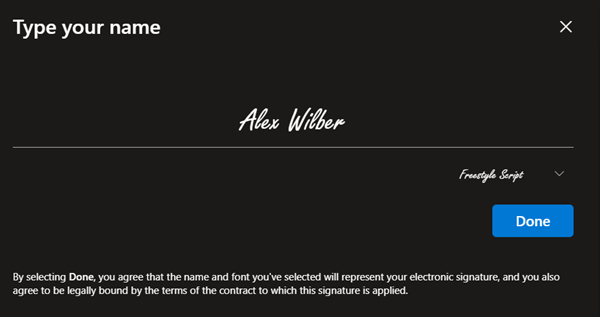
Type your name as the signature

After the update, users can switch between typed and drawn signatures. Users can also clear the signature to start fresh.
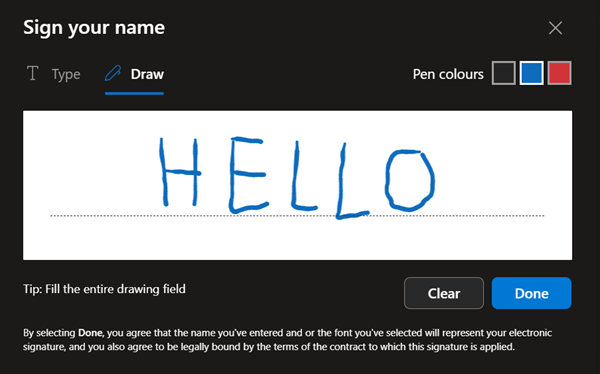
Switch between typed and drawn signatures

The draw option supports input via stylus, touch, or mouse in three different colours.
The draw option is available by default if eSignature for Microsoft 365 is configured and enabled for the SharePoint site collection.

Reminder:
eSignature for Microsoft 365 is a SharePoint Premium Pay-as-you-go service that requires a PAYG setup, even if you use another signature provider.

Share
Avatar photo

Tobias Asböck

Tobias is a Senior System Engineer with more than 10 years of professional experience with Microsoft 365 products such as SharePoint Online, SharePoint Premium, OneDrive for Business, Teams Collaboration, Entra ID, Information Protection, Universal Print, and Microsoft 365 Licensing. He also has 15+ years of experience planning, administering, and operating SharePoint Server environments. Tobias is a PowerShell Scripter with certifications for Microsoft 365 products. In his spare time, Tobias is busy with updates in the Microsoft 365 world or on the road with his road bike and other sports activities. If you have additional questions, please contact me via LinkedIn or [email protected].

Leave a Reply

Your email address will not be published. Required fields are marked *