
As announced a few days ago, the former SharePoint Knowledge Agent has been rebranded to AI in SharePoint. AI in SharePoint is still in Public Preview, and a Microsoft 365 Copilot license is required to use it.
If you try to use the previous SharePoint Knowledge Agent, it may no longer respond. You might experience endless connecting, no response, or an error message.
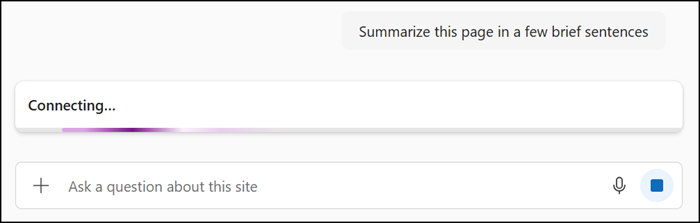
This is because AI in SharePoint now relies on Anthropic’s Claude for its advanced AI capabilities.
Microsoft includes the following note in the documentation:
If Anthropic is not enabled, AI in SharePoint will not function, even if the tenant is opted into the Public Preview and users have Microsoft 365 Copilot licenses. Users will see an error message that says “This preview experience isn’t available because of your organization’s AI provider settings” when they try to execute a prompt. Admins who have previously opted in to AI in SharePoint but do not wish to enable Anthropic should opt out of the AI in SharePoint Public Preview to avoid a degraded end‑user experience.
This degraded end‑user experience occurs when Anthropic has not been enabled, or has been actively disabled, as a Microsoft subprocessor in the tenant.
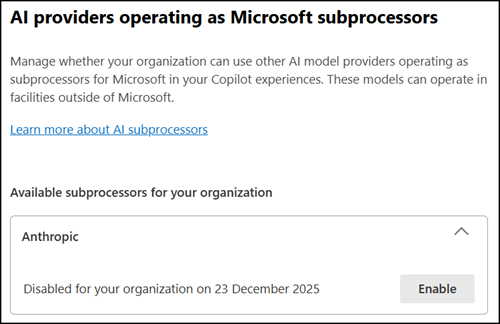
For Anthropic, organizations should be aware of the following regional considerations, as highlighted by Microsoft in their documentation:
For tenants based in the European Union or United Kingdom, Anthropic is disabled by default because it is currently excluded from EU data boundary commitments. To continue using AI in SharePoint during Public Preview, EU and UK tenant administrators must explicitly enable Anthropic in the Microsoft Admin Center.
Microsoft has acknowledged this limitation may prevent organizations from using AI in SharePoint and has committed to addressing it before the feature reaches general availability.
…based on your location, you may need to opt-in to allow Anthropic as a sub processor for Microsoft Online Services in order for the new preview functionality to work. We recognize this may not be an option for all our customers, and we will address before General Availability of AI in SharePoint.
