
Microsoft will enable the feature to find Edge browsing history in Microsoft 365 Copilot Search. If the feature is enabled, the Edge browser will soon send its browsing history to Microsoft 365 Copilot Search, allowing it to deliver more relevant and personalized search results.
- Users require a Microsoft 365 Copilot license to find Edge browser history in Microsoft 365 Copilot Search, as Copilot Search is only available to Copilot-licensed users. Users without a license use the standard Microsoft Search.
- Users must be signed in to Microsoft Edge with an Entra ID account.
Edge administrators can disable this behavior via the policy ShareBrowsingHistoryWithCopilotSearchAllowed. The policy is enabled when not configured.
Navigate to the Edge policy page (edge://policy) and search for ShareBrowsingHistoryWithCopilotSearchAllowed to check the current state. An empty value indicates the policy is not configured = the default behavior applies.
ShareBrowsingHistoryWithCopilotSearchAllowed
If you enable or don’t configure this policy, browsing history will be shared with Microsoft 365 Copilot Search by default, and users can turn off sharing using the toggle in Microsoft Edge settings. If you disable this policy, browsing history won’t be shared with Microsoft 365 Copilot Search.
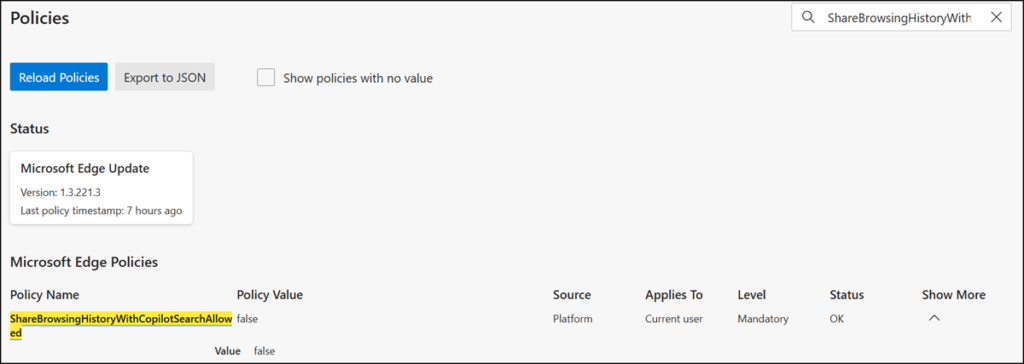
An important addition:
The Edge setting “Allow Copilot to use browser content” in the Copilot sidebar integration is unrelated to the ShareBrowsingHistoryWithCopilotSearchAllowed policy. Disabling the policy does not affect this setting.
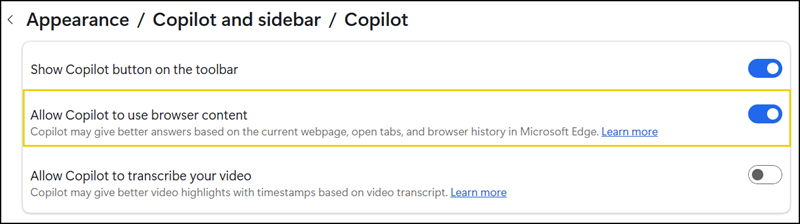
“Allow Copilot to use browser content” in the Copilot sidebar corresponds to the EdgeEntraCopilotPageContext policy.
EdgeEntraCopilotPageContext
This policy controls whether Copilot in the Microsoft Edge sidepane can access Microsoft Edge page content. This includes page summarization and similar contextual queries sent to Copilot.
If you disable this policy, Copilot can’t access Microsoft Edge page content.
If you don’t configure this policy, the default behavior is:
- For non-EU countries, access is enabled by default.
- For EU countries, access is disabled by default.
- In both cases, if you don’t configure the policy, users can enable or disable Copilot access to Microsoft Edge page content using the toggle in Microsoft Edge settings.
Now you have both Copilot settings disabled.
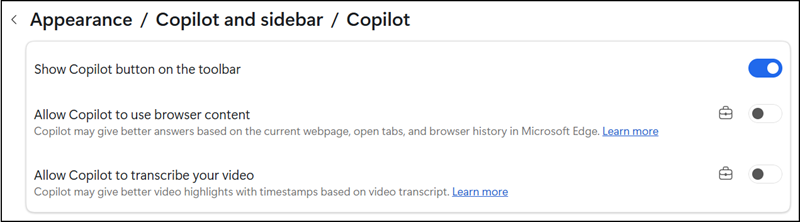
And if you want to disable the entire Copilot button, just configure the EdgeCopilotEnabled policy. 👍
