
Since the release of Edge 145, organizations can offer users a simpler way to switch between the Stable and Beta channels in Edge for Business. This option is still in Public Preview.
Edge Enterprise Preview adds a direct option in the Edge About section to activate the Preview channel. When enabled, Edge automatically downloads the latest pre-release build and prompts the user to restart the browser.
Enterprise preview provides a simpler way for admins to flight pre-release Edge builds to their users. To reduce friction and bolster usage, users will receive pre-release builds directly inside of their Stable Edge application. Admins can allow users to easily opt-out of the preview experience, using built-in rollback to switch between their pre-release and stable channels with ease.
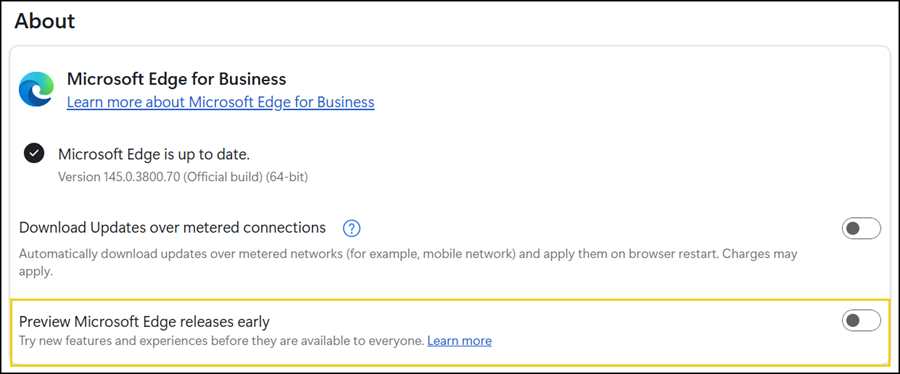
You need to enable two Edge policies to get this switch.
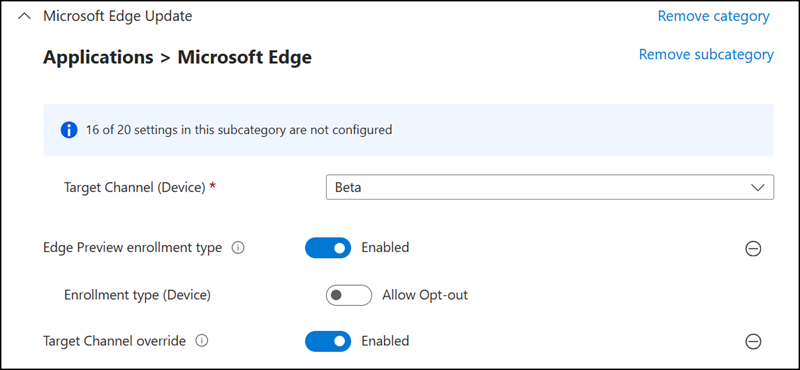
- Provide the Edge Beta or Dev channel to your users via the TargetChannel policy. This policy pushes the Beta or Dev channel to the user instead of the default Stable channel.
Important:
As a side effect, Edge may update to the next pre-release build before you can disable the new “Preview Microsoft Edge release early” option, depending on what the user selects during the browser restart. By default, Edge will activate the pre-release channel. - Enable the EdgePreviewEnrollmentType policy. You can also define whether users are allowed to leave the Edge Preview experience.
The new EdgePreviewEnrollmentType policy gives end users the option to seamlessly return to the Stable channel, rather than being stuck in the channel set by TargetChannel. This allows end users to move back to a functional version of Edge if a pre-release build negatively affects productivity.
The EdgePreviewEnrollmentType policy is only effective if the TargetChannel policy is set to Beta or Dev.
- If you set this policy to Allow Opt-out (1) or don’t configure it, the channel in the Edge Stable application will be determined by TargetChannel. End users will be able to exit the Edge Preview experience and return to the Stable channel at any time.
- If you set this policy to Required (3), the channel within the Edge Stable application is determined by TargetChannel. End users will not be able to leave the Edge Preview experience.
I configured both policies in my setup.
Be careful:
Switching from Edge Beta 146 to Edge Stable 145 via the new Edge Enterprise Preview option caused my browser to reset. This may be a preview-related bug.
