Admin activity related to Microsoft Copilot agent management is now recorded in the Microsoft Purview Audit Logs. This update should improve visibility and traceability for security and compliance teams working across Microsoft 365 tenants.
Compliance administrators can track Copilot agent administrative activities in the Purview Audit Logs. This includes publishing, deploying, removing, and updating agents, as well as some tenant-wide changes to Agent 365 settings. Audit data is retained for up to 180 days, or up to 365 days with a Microsoft 365/Office 365 E5 license. The audit schema includes key identifiers such as agent name, agent type, and admin ID.
Note
Copilot agent administrative activities are not collected in Microsoft Sentinel when using the Microsoft 365 connector. These activities are collected when your tool uses the Office 365 Management Activity API, such as Splunk.
In my example, I collect audit logs using PowerShell because this approach is more flexible and easier to reuse later.
Copilot agents are scoped to the AuditLogsQuery-Entra.Read.All permission.
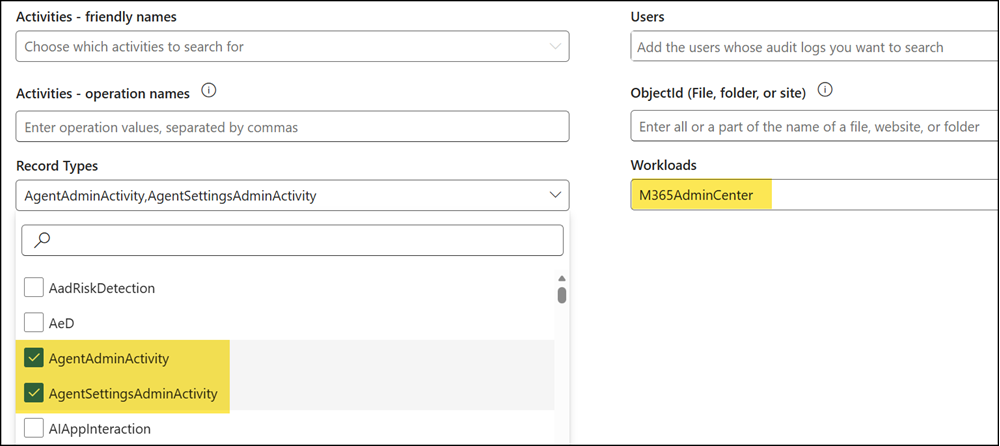
Use the following filter values:
- Workload: M365AdminCenter
- RecordType: AgentAdminActivity, AgentSettingsAdminActivity
My tests confirm it: Administrative activities are logged only for Copilot Studio agents. Microsoft prebuilt agents (such as Researcher and Analyst), third-party agents, and SharePoint agents are not yet included.
A good example is the misdeployed Yuwu9669P1 agent. I was unable to trace this agent’s history in the audit logs. The same limitation applies to Microsoft prebuilt agents.
Be patient:
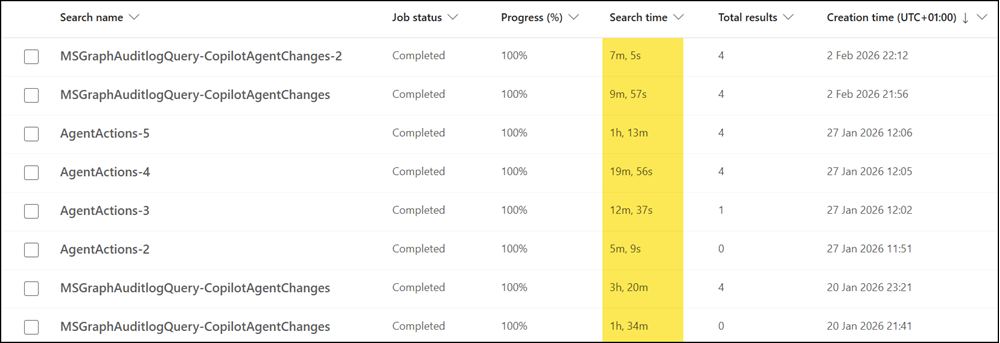
Audit log searches can take minutes or even hours, depending on Microsoft system performance. There is no reliable estimate.
For example, one of my searches covering a 90-day window took 3 hours and 20 minutes on one day, and just 7 minutes on another. The “AgentActions” searches on 27 January relate to my investigation of the Yuwu9669P1 agent.
Below is my PowerShell sample. I added a loop that waits up to one hour for the search to complete. Adapt it as needed for your own environment.
<#
  The commands create an audit log query via the Microsoft Graph API
  to retrieve Copilot Agent-related activities (AgentAdminActivity, AgentSettingsAdminActivity)
  from the M365 Admin Center over the last 90 days. It polls the query status until completion,
  then retrieves all results with pagination support.
#>

Import-Module Microsoft.Graph.Authentication
Connect-MgGraph -Scopes AuditLogsQuery-Entra.Read.All


# Create a new Audit Log Query for Copilot Agent changes in the last 90 days
$StartDate = (Get-Date).AddDays(-90).ToString("yyyy-MM-ddT00:00:00Z")
$EndDate = (Get-Date).ToString("yyyy-MM-ddTHH:mm:ssZ")

$Body =
@"
{
    "displayName": "MSGraphAuditlogQuery-CopilotAgentChanges",
    "filterStartDateTime": "$StartDate",
    "filterEndDateTime": "$EndDate",
    "serviceFilters": ["M365AdminCenter"],
    "recordTypeFilters": [
        "AgentAdminActivity",
        "AgentSettingsAdminActivity"
    ],
  }
"@

$Url = "https://graph.microsoft.com/beta/security/auditLog/queries"
$AuditLogNewQuery = Invoke-MgGraphRequest -Method POST -Uri $Url -Body $Body -ContentType "application/json"

# Poll the query status until it is completed, wait up to 60 minutes
$AuditLogNewQueryID = $AuditLogNewQuery.id
$QueryUrl = "https://graph.microsoft.com/beta/security/auditLog/queries/$AuditLogNewQueryID"

$QueryTimeoutMinutes = 60
$QueryPollIntervalSeconds = 60
$QueryStartTime = Get-Date

do {
    $Result = Invoke-MgGraphRequest -Method Get -Uri $QueryUrl -ContentType "application/json"

    Write-Host ("[{0}] Status: {1}" -f (Get-Date -Format "HH:mm:ss"), $Result.status)

    if ($Result.status -eq "succeeded") {
        Write-Host "Audit log query completed successfully."
        break
    }

    if ($Result.status -eq "failed") {
        throw "Audit log query failed. QueryId: $AuditLogNewQueryID"
    }

    Start-Sleep -Seconds $QueryPollIntervalSeconds

} while ((Get-Date) -lt $QueryStartTime.AddMinutes($QueryTimeoutMinutes))

if ($Result.status -ne "succeeded") {
    throw "Timeout reached. Audit log query did not complete within $QueryTimeoutMinutes minutes."
}

# Get the results of the search job (paging included)
$Url = "https://graph.microsoft.com/beta/security/auditLog/queries/$AuditLogNewQueryID/records?`$top=1000"
$AuditLogNewQueryResultRecords = @()

While ( $null -ne $Url ) {
    $data = Invoke-MgGraphRequest -Method GET -Uri $Url -ContentType "application/json"
    $AuditLogNewQueryResultRecords += $data.Value
    $Url = $data.'@Odata.NextLink'
}

# Output the results
$AuditLogNewQueryResultRecords.auditData | select CreationTime,Id,Workload,Operation,AgentName,AgentId,Resource,UserId,AppIdentity | sort CreationTime
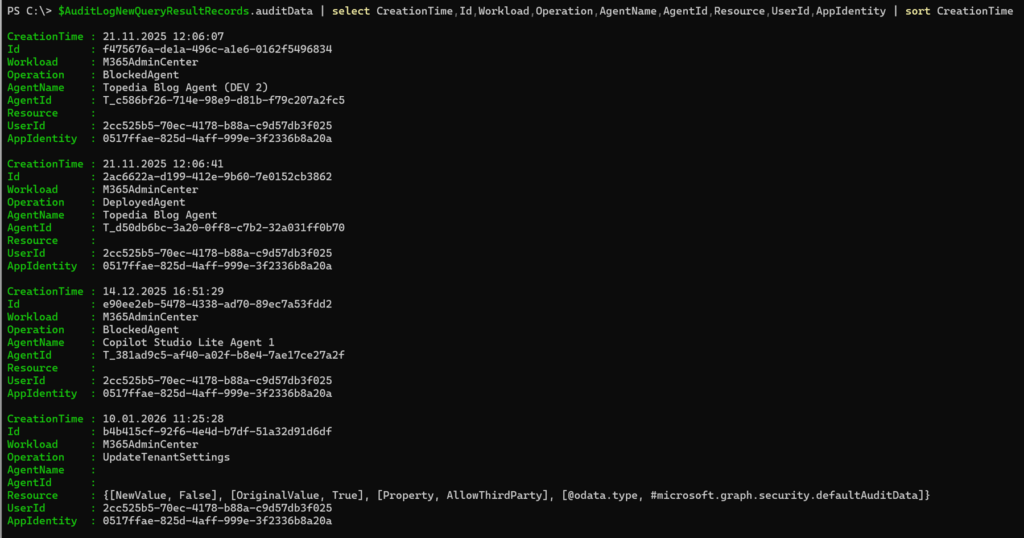
The results show both agent-level changes and tenant-level changes.
The AppIdentity 0517ffae-825d-4aff-999e-3f2336b8a20a refers to the M365 App Management Service application from Microsoft.
- The logs include my agent block actions.
- The logs also include the change that disabled third-party agents in Agent 365.
- The logs do not capture activities related to Microsoft prebuilt agents or SharePoint agents, even when these agents are blocked through Agent 365.