
Since 7 January 2026, Microsoft has been enabling Anthropic as a subprocessor for specific Microsoft 365 commercial tenants, as announced in December. Anthropic has been onboarded as a Microsoft subprocessor to support this change.
This change affects Microsoft 365 Copilot and Microsoft Copilot Studio, including selected Frontier features such as Word, Excel, and PowerPoint Agents, Researcher agent, and Agent Mode in Excel.
If you have not yet verified your settings during the past few weeks, or if you prefer to explicitly control the configuration rather than rely on a Microsoft rollout, you should review and manage this setting.
Timeline
- Since 8 December 2025:
- The new Anthropic models admin toggle is available in the Microsoft 365 admin center.
- The toggle is enabled by default for most commercial tenants, except for tenants in the EU, EFTA, and the UK.
- Tenants in excluded regions that previously opted into the legacy toggle must explicitly opt into the new subprocessor toggle to continue using Anthropic models.
- The toggle is not available in government or sovereign clouds.
- Starting 7 January 2026:
Anthropic becomes enabled as a Microsoft subprocessor on tenants where the toggle is on. The legacy opt-in toggle (from September 2025) tied to Anthropic’s own commercial terms is deprecated.
How does this affect your organization?
Starting 7 January 2026, Anthropic operates under Microsoft’s direction and contractual safeguards, including the Microsoft Data Protection Addendum and the Product Terms. The use of Anthropic models in Microsoft 365 Copilot is covered by Enterprise Data Protection.
Important:
Anthropic models are currently excluded from the EU Data Boundary and in-country processing commitments. This may be relevant if this is a mandatory requirement for your organization.
As communicated by Microsoft in November 2025, in-country processing commitments became available to customers in Australia, the United Kingdom, India, and Japan by the end of 2025. Additional countries should follow in 2026.
Users with the AI Administrator role should review and explicitly set the Anthropic subprocessor setting in the Microsoft 365 admin center if this has not already been done in December. The change requires only a single click.
Navigate to Microsoft 365 admin center > Copilot > Settings > Data access > AI providers operating as Microsoft subprocessors.
An AI Administrator can enable or disable Anthropic as a subprocessor as required.
- This setting should be disabled by default for tenants in the EU, EFTA, and the UK.
- This setting is not available in government (such as GCC, GCC High, DoD) or sovereign clouds.
- This setting should be enabled by default for all other tenants.
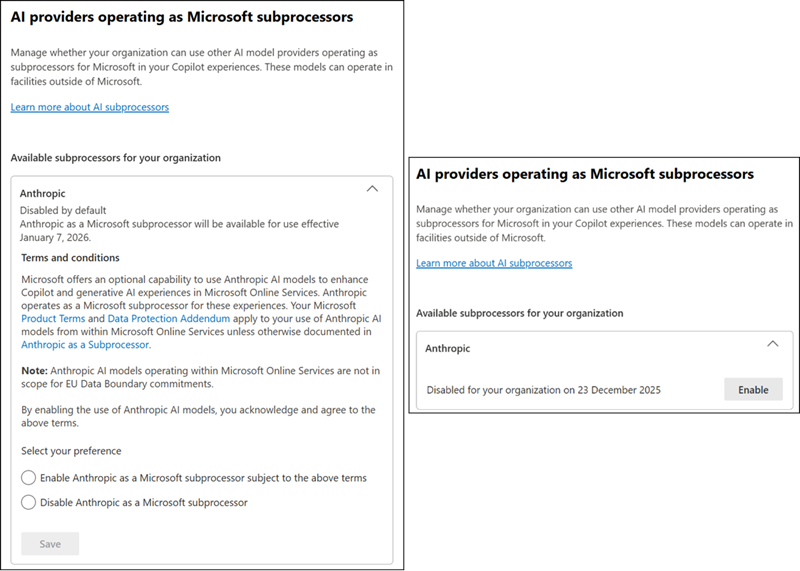
Microsoft also referenced the previous setting from September 2025, which becomes deprecated after this rollout.

