
Name pronunciation and Pronouns settings have moved to People settings

Microsoft is updating the Microsoft 365 admin center to consolidate people-related configuration. The controls for Name pronunciation and Pronouns are moving to People settings under Org settings in the admin center.

Timeline

The rollout should be completed in December 2025.

What is changing

This update only changes where people administrators can find the settings for Name pronunciation and Pronouns in the Microsoft 365 admin center. The settings themselves and their functionality remain unchanged.

Previously, both settings were located under Org settings > Service & privacy.
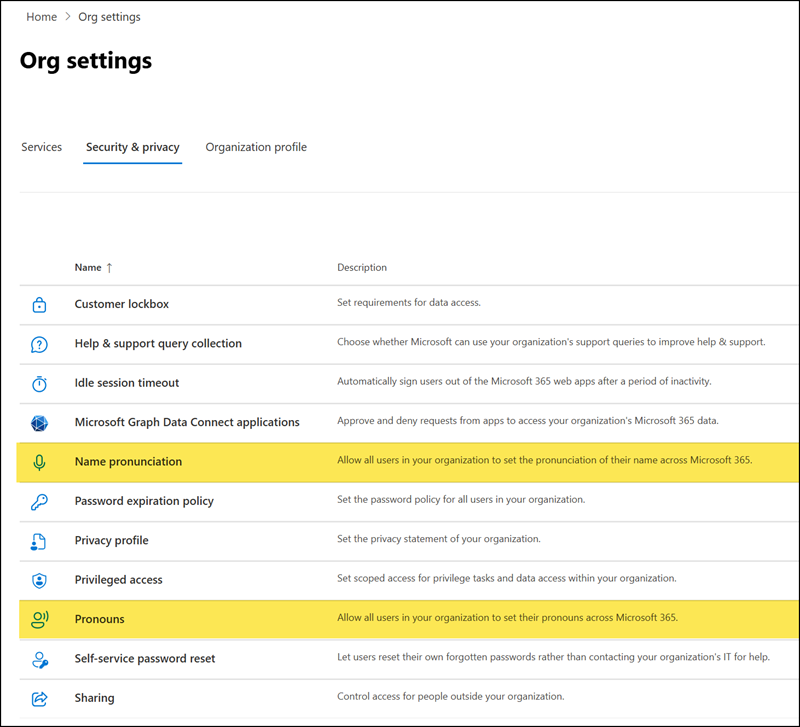
Previously location
Previous location

The two settings are now located under Org settings > Services > People settings, which Microsoft introduced in August 2025. Users with the People Administrator role have the required permissions to manage these settings.
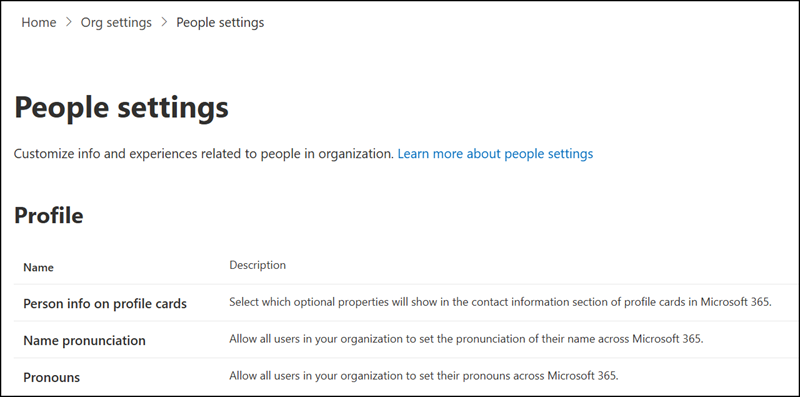

New location
New location
Share
Avatar photo

Tobias Asböck

Tobias is a Senior System Engineer with more than 10 years of professional experience with Microsoft 365 products such as SharePoint Online, SharePoint Premium, OneDrive for Business, Teams Collaboration, Entra ID, Information Protection, Universal Print, and Microsoft 365 Licensing. He also has 15+ years of experience planning, administering, and operating SharePoint Server environments. Tobias is a PowerShell Scripter with certifications for Microsoft 365 products. In his spare time, Tobias is busy with updates in the Microsoft 365 world or on the road with his road bike and other sports activities. If you have additional questions, please contact me via LinkedIn or [email protected].

Leave a Reply

Your email address will not be published. Required fields are marked *