
PowerPoint now supports Brand Images, an in-app experience that lets users insert organization-approved logos, icons, and images directly into their presentations. These assets come from a SharePoint Organization Assets Library (OAL).
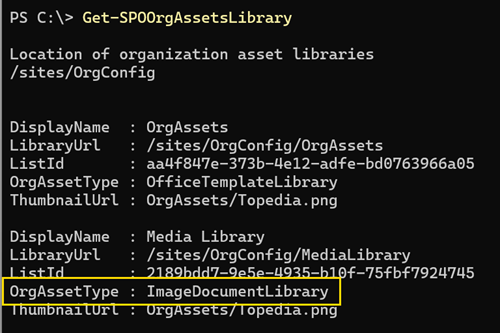
This update is available for organizations with a SharePoint Organization Assets Library configured using the ImageDocumentLibrary asset type.
Timeline
- Brand Images is available in PowerPoint on the web.
- Brand Images is available in PowerPoint for desktop, although availability may be delayed depending on your Microsoft 365 Apps release channel.
Impact for your users
Users find a new option in PowerPoint that allows them to insert Brand Images directly into their presentations.
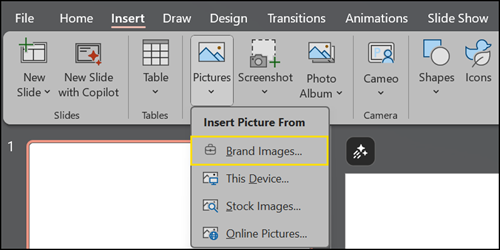
Brand Images lists approved images, icons, and logos from your organization. Users can browse, search, and insert images directly from the centralized library within PowerPoint. Users can switch between libraries if multiple image libraries are configured.

Impact for SharePoint administrators
Brand Images are connected to an Organization Assets Library configured by a SharePoint administrator.
- The library must use the ImageDocumentLibrary asset type; otherwise, PowerPoint will not list the library in Brand Images.
- Use top-level folders (L1) by asset type (for example, logos or images) to enable type-based filtering; subfolders are not supported for filtering.
- Improve search quality by applying descriptive image tags and metadata to each image.
Note:
An Organization Assets Library follows the default SharePoint permissions model.
The library should be readable by all users. Access can still be restricted so specific departments see different assets, or only designated users can update them.
