
Microsoft is retiring the legacy Identity Client Runtime Library (IDCRL) authentication protocol in SharePoint Online and OneDrive for Business. This change transitions both services to modern standards, including OpenID Connect and OAuth 2.0, reducing reliance on outdated authentication methods.
Timeline
- 31 January 2026: Legacy IDCRL authentication is blocked by default. Organizations may temporarily re-enable it via PowerShell until the end of April 2026.
- 1 May 2026: Legacy IDCRL authentication is permanently blocked and cannot be re-enabled.
How does this affect your organization?
Any organization using clients, scripts, or applications that rely on IDCRL to access SharePoint Online or OneDrive for Business is affected and must migrate to modern standards such as OpenID Connect or OAuth 2.0.
SharePoint admins should use the Purview Audit Logs to identify IDCRLSuccessSignIn activities. If such activities are listed in your tenant, application owners must update their authentication logic. The SharePoint team has published guidance on detecting these activities and migrating from IDCRL to modern authentication.
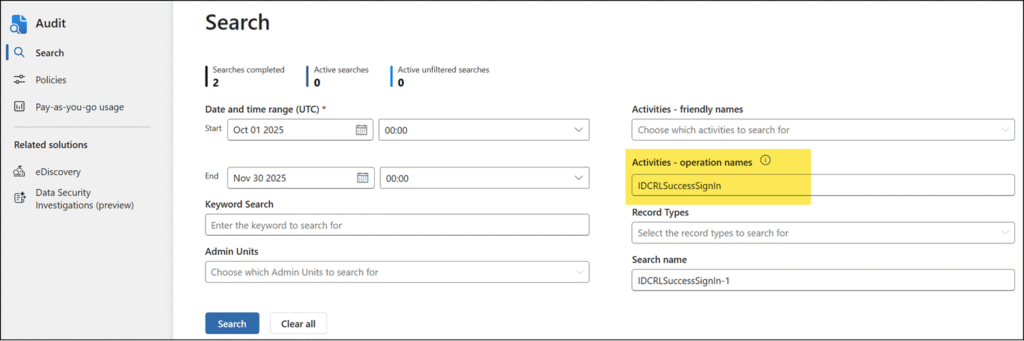
If you are using a Log Analytics Workspace for Purview Audit Logs, this KQL query identifies IDCRL sign-ins from the last 45 days:
OfficeActivity
| where TimeGenerated >= ago(45d)
| where OfficeWorkload == "SharePoint"
| where Operation == "IDCRLSuccessSignIn"
| distinct UserKey
This change affects the global SharePoint tenant setting LegacyAuthProtocolsEnabled, which is currently set to True by default.
LegacyAuthProtocolsEnabled
By default, this value is set to $True, which means that authentication using legacy protocols is enabled.
Setting this parameter to $False prevents Office clients using non-modern authentication protocols from accessing SharePoint Online resources.
- True – Enables Office clients using non-modern authentication protocols (such as Forms-Based Authentication (FBA) or Identity Client Runtime Library (IDCRL)) to access SharePoint resources.
- False – Prevents Office clients using non-modern authentication protocols from accessing SharePoint Online resources.
You must update the SharePoint tenant setting AllowLegacyAuthProtocolsEnabledSetting to extend the retirement period to 30 April 2026. This setting is False by default. As Microsoft notes, both settings must be set to True to extend support through April 2026.

These settings cannot be re-enabled in May 2026.
Applications using legacy authentication protocols will fail to authenticate unless migrated to modern protocols by 1 May 2026.
